How UK photo shops should take passport photos for elderly and disabled customers
A counter guide for UK studios and pharmacies: seat the customer, reshoot shop faults, and point a disability explanation to the GOV.UK form with a Photo Code.
A customer who needs to sit, who cannot look straight at the camera, or who uses a hearing aid is a normal counter job. Age on its own does not change the photograph. A disability changes it only when that disability is why a rule cannot be met. Shadow, glare, a carer in the frame and a beauty filter are still reshoots.
This guide is for UK photo studios, camera shops and pharmacy counters. One sitting becomes a digital passport photo, a Photo Code that can be used for an HMPO online application, and a print sheet when they want paper. Passport Photo Code is independent of GOV.UK and HM Passport Office. HM Passport Office makes the final decision on every photograph.
The applicant page is passport services if you're disabled. Photo rules are on photos for passports. Examiner detail is in Photo standards (version 51.0, updated 4 March 2026). Checked on 22 October 2026.
Does being older change the rules?
No. An older customer follows the adult rules: a new photograph from the last month, a plain light background, even light, face forward, a plain expression, mouth closed, eyes open and visible, and nobody else in the frame. Lines, grey hair and age spots are the likeness. Do not smooth them. Photos for passports says the file must be unaltered by computer software.
A requested smile, a high camera, portrait mode or a carer’s shoulder is a shop fault, not a disability. Ask what they can do. Do not ask for proof, and do not write a diagnosis on the slip. See GDPR basics for passport photo shops. Under-six expression rules are age rules, covered in the baby and child guide.
What should you ask before the first frame?
Say the price first. It is the same package as any other UK passport photograph, not a surcharge for sitting down. How to set the card is in what to charge for prints plus a code.
- Whose passport, and is it a UK passport? A visa crop is a different job.
- Online, paper, or both? Online needs a Photo Code. A paper form needs two identical prints, 45mm high by 35mm wide. The code does not replace those prints.
- Do you need to sit? Offer the chair. A booth whose camera cannot drop to face height is the wrong tool. Use a counter camera or a phone on a tripod you can lower. See offering codes without a booth.
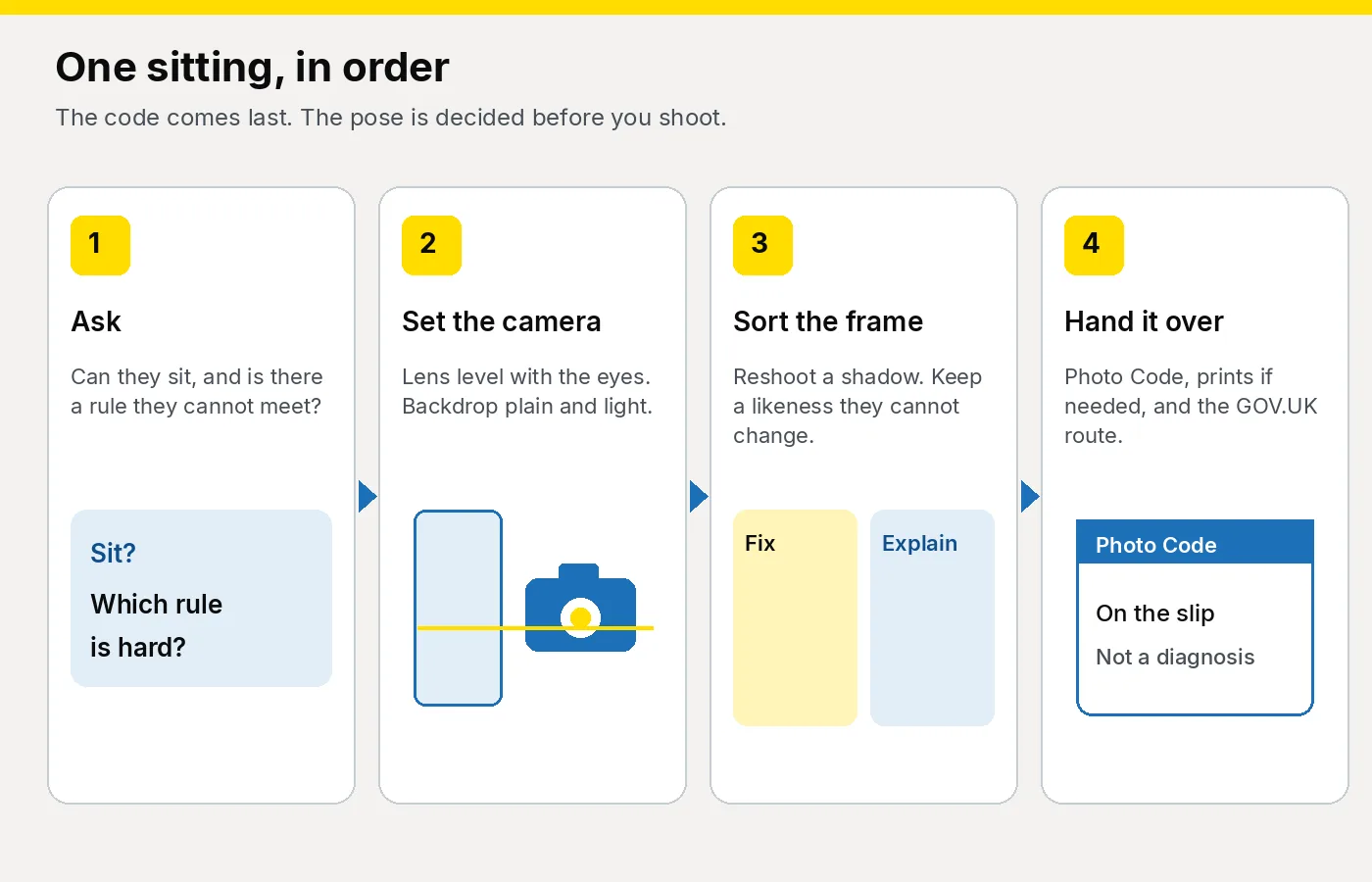
- Is there a rule you cannot meet? Gaze, mouth, expression, a square face, eyes open. If they can meet it, shoot to the rule. If they cannot, take a true likeness. You do not decide the outcome.
Do not start this in a pharmacy queue. See pharmacies and camera shops.
Which faults do you still reshoot?
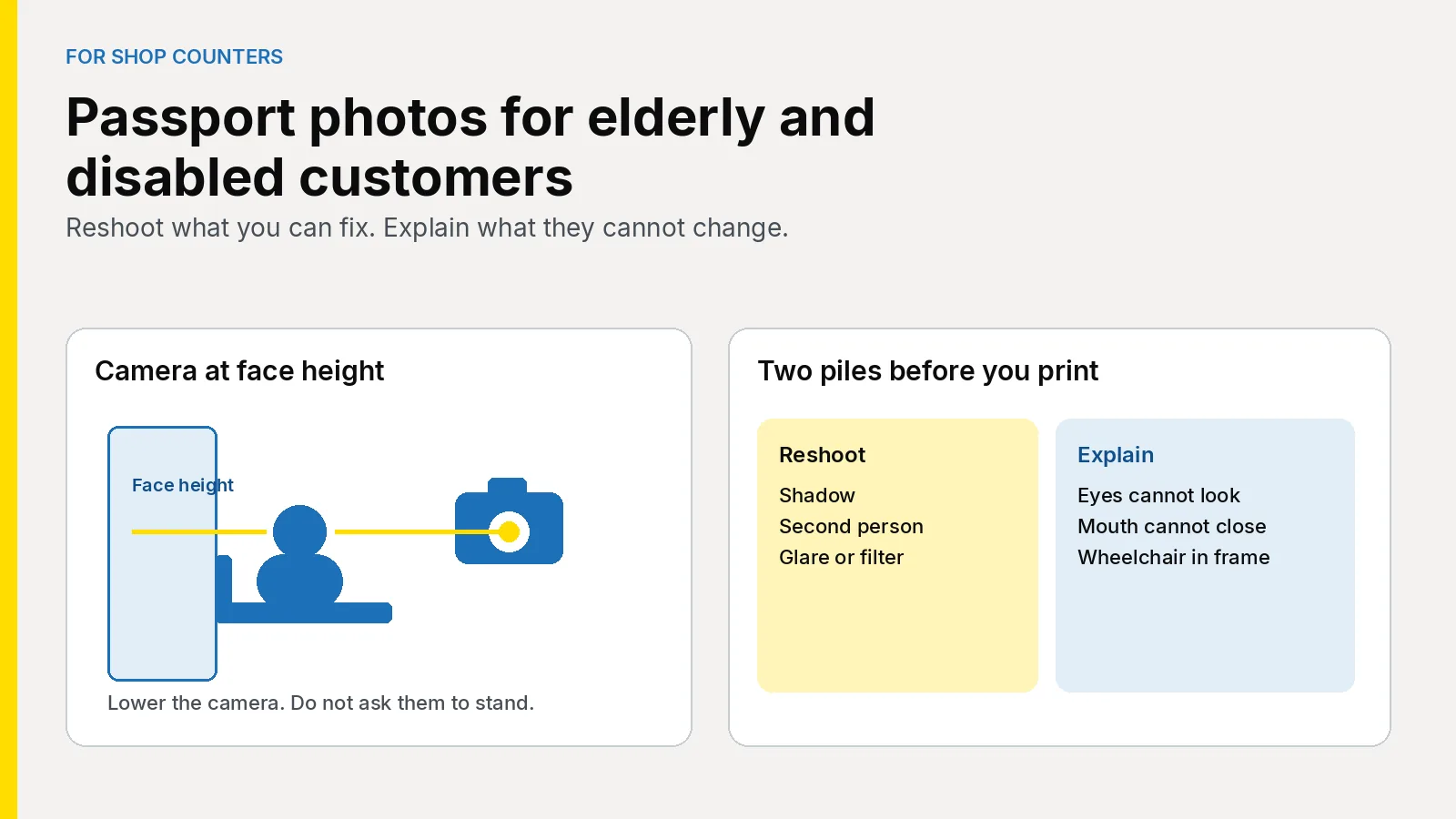
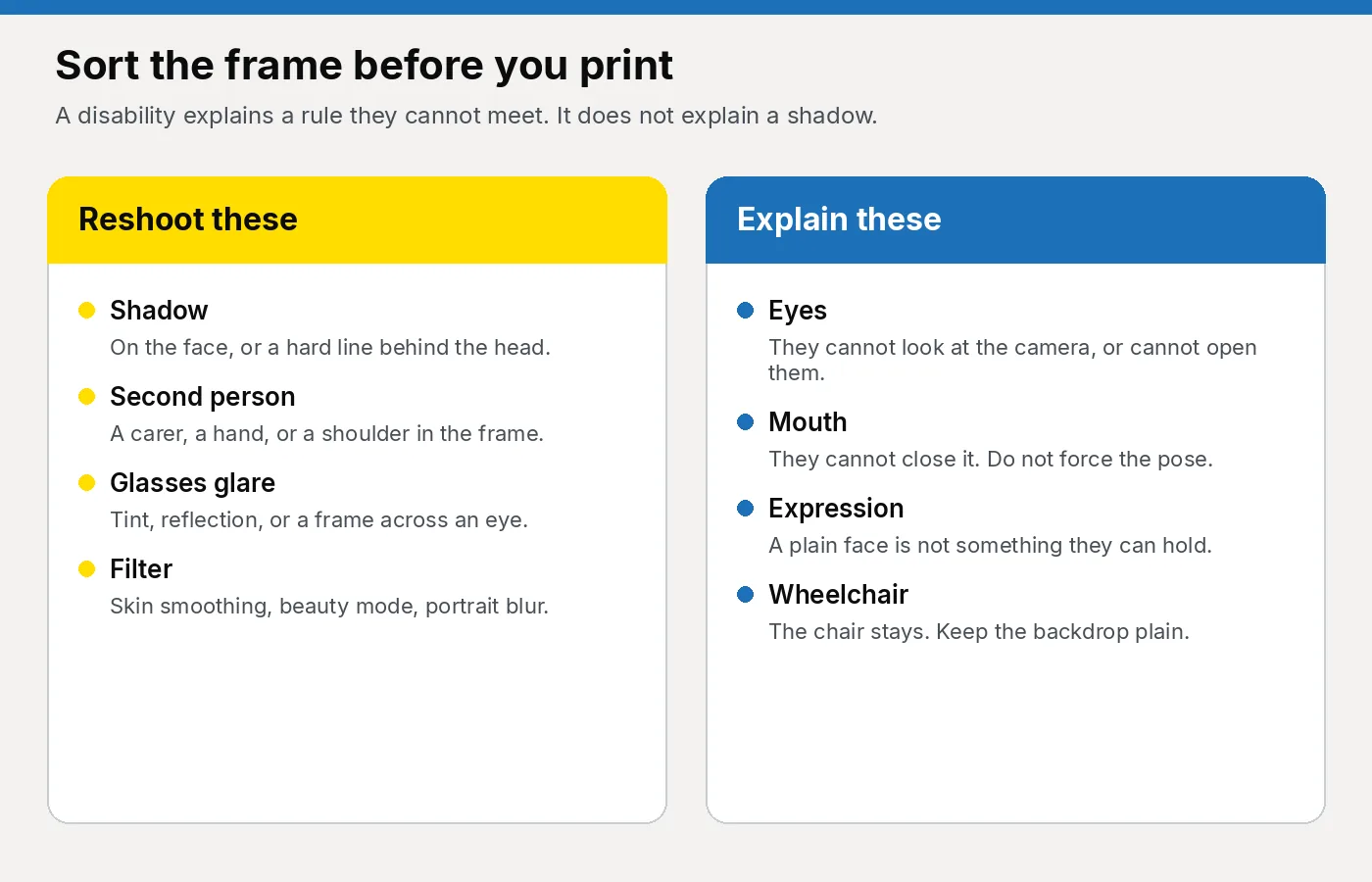
Sort the frame before you print. One pile is yours to reshoot. The other is explained on the application, and only when a disability is the reason. A shadow is never that reason.
| What you see | What you do |
|---|---|
| Shadow on the face, or a hard shadow behind the head | Move the light or the chair and shoot again. |
| A carer, a hand, or a walking frame in the picture | They step out. The photograph is of one person. |
| Glare, tint, or a frame across an eye | Glasses off if they can. Otherwise move the light. See the glasses guide. |
| Headphones or earbuds | Off. Hearing aids stay. Examiner guidance does not treat them as headphones. |
| A filter, skin smoothing, or portrait-mode blur | Turn it off and shoot again. |
| A black eye or other short-term injury | Not this route. Do not retouch it. |
| Cannot look at the camera, cannot close the mouth, eyes shut from sight loss, or a wheelchair in frame | Keep the likeness. They explain it on the form. |
When does a disability change the photograph?
GOV.UK’s page for disabled applicants says there is help with the photograph. If a disability means it cannot meet the rules, the applicant says so and sends evidence.
Online, the photo is checked automatically. If it falls short, GOV.UK tells them to submit it and explain why in the additional information, plus a letter naming the condition and whether it is temporary or permanent. The letter carries more weight from a doctor, a consultant, a carer or a parent. The applicant can write it. Afterwards they are told which passport office receives it. You do not post it unless they ask, and you do not keep a copy.
Photo standards is written for examiners. Some standards may be set aside where a disability stops the person meeting them, when that is clear from the photo or the application, or when a statement comes from the customer, a parent, a carer or a doctor. Those standards are gaze, eye position, mouth, expression, a square face, and a plain background that still shows a wheelchair or similar aid. The face still has to be visible. A Photo Code does not decide it.
- Sight. Eyes shut because of sight loss may still be considered. A long-term eye patch is a different case from a short-term one. Tinted glasses come off. Do not hold the eyes open.
- Mouth. A relaxed mouth may show teeth. Do not force it shut when a medical condition prevents that.
Do not stretch this to a smile, a hat or a filter. Religious and medical head coverings are a different rule, in the glasses and head coverings guide. A bandage worn every day can stay. Do not ask anyone to uncover a wound.
How do you photograph someone who is seated?
The camera moves. The pose does not get looser because the chair is lower. GOV.UK’s guide to taking the photo puts the subject about 50 centimetres from a plain light background, camera at face height. Match that when they are sitting.
- Use a chair with a low back, or hide a high back with the backdrop. Cream, ivory and light grey are the plain examples in the examiner guidance.
- Put the lens at face height. A standing-height booth looks down and tilts the head. Lower a tripod, or use the counter camera.
- Leave about half a metre to the backdrop so the head does not throw a hard shadow. If a wheelchair needs more floor, move the backdrop.
- Light from the front, a little above the eyes. A ceiling spot shades the brow and the wall behind the ears.
- One person only. A carer may wait in the room, then step out. A hand on the shoulder is a second person.
- Take two or three frames and check the sharpest at full size: eyes, shadow, chair pattern, collar, headphones.
- Do not crop to a passport rectangle. Leave head, shoulders and a margin.
If they cannot come in, take the same list with you. Hang a plain sheet in place of a patterned lounge wall, and generate the code on a laptop before you leave. If tubing crosses the mouth, ask if it can sit clear for one frame. If it must stay, do not clone it out.
What do you say when you hand it over?
Read the code aloud, dots included. Watch 0 and O, and 1 and I. Put a name on each code if more than one person came in. Slip wording is in what to print. Leave the condition off the slip.
“Type this code on the online passport application and check the photograph that appears is you. The code can be used for an HMPO online application. If a rule could not be met because of a disability, GOV.UK explains how to say so, and what letter to send. We are not the Passport Office, and they make the final decision. On a paper form, use the prints, not the code.”
If they want a promise, repeat what you fixed and what you could not change, then stop. Deaf, hard-of-hearing, blind and partially sighted customers can ask the Passport Adviceline about formats and help. That is on the same GOV.UK page.
How does the studio software fit this sitting?
Upload the frame in Passport Photo Studio. It formats a digital passport photo to the UK specification. A flag means look again. It is not a decision by HM Passport Office. Reshoot a shadow or a carer. If they cannot look at the camera, and they have said so, keep that frame and generate the code. Do not paint the eyes.
One job should produce the file, the code and the print sheet on the printer you already own. The loop is the staff checklist. A code that fails to load is a different problem: use the shop playbook.
- One capture, three outputs. Do not buy a booth just to lower a camera, and do not change printers to issue a code. Pharmacies and camera shops each have a short page on that.
- A browser login, including a laptop if you visit. The £2.99 order on this site is for someone preparing their own photograph at home. A paying customer does not belong there.
- A slip with the code and no diagnosis on it.
Plans are on the pricing page. The workspace is the studio overview, with buying notes in the studio software guide.
How do you start this week?
- Read the studio overview so staff know the counter login from the home order.
- Put a chair and a tripod you can drop to face height by the backdrop. Test both before Saturday.
- Pin the two-pile card beside the staff checklist.
- Run one seated frame through Passport Photo Studio to a code and a print.
- Teach the handover sentence. The longer session is training seasonal staff.
- For the shop’s own plan, use pricing or email [email protected].
Frequently asked questions
Does being older change the UK passport photo rules?
No. Adult rules still apply. Keep the lines and grey hair, and do not ask for a smile. Disability is a separate question: it matters only when a rule cannot be met.
Can the customer sit for a passport photo?
Yes. Offer a chair, set the camera at face height, and use a plain light backdrop. A booth fixed at standing height is the wrong camera.
What if they cannot look at the camera or close their mouth?
Take a true likeness. They explain it in the additional information and send a letter, as GOV.UK describes. HM Passport Office decides whether a standard is set aside.
Are hearing aids allowed in a UK passport photo?
Yes. Leave visible hearing aids on. Headphones and earbuds come off.
What if a wheelchair shows in the picture?
Leave them in the chair and keep the rest of the background plain. That is the examiner guidance example. The decision is not the shop’s.
Should the shop write the medical letter?
No. It belongs with the application. GOV.UK says it carries more weight from a doctor, a consultant, a carer or a parent, and that the applicant can write it. Do not demand it before the photograph.
Does the Photo Code mean the photograph meets the rules?
No. It lets the online form retrieve the digital photograph, and it can be used for an HMPO online application. A rule they could not meet still needs the GOV.UK explanation.
Should you charge extra because the customer is disabled?
No. Use the usual package, agreed before you shoot. See what to charge.
The card by the camera
Sit them and drop the camera to face height. Reshoot shadows, glare, filters and extra people. Where the rules can be met, the digital photo should meet GOV.UK photo rules. Add a Photo Code for an HMPO online application, and a print sheet if they want paper. Do not promise a result. Start at the studio overview.