Mobile passport photos for care homes and housebound customers
A visit guide for UK studios and pharmacies: what to pack, how to light a care-home room, and how to issue a Photo Code on a laptop before you leave.
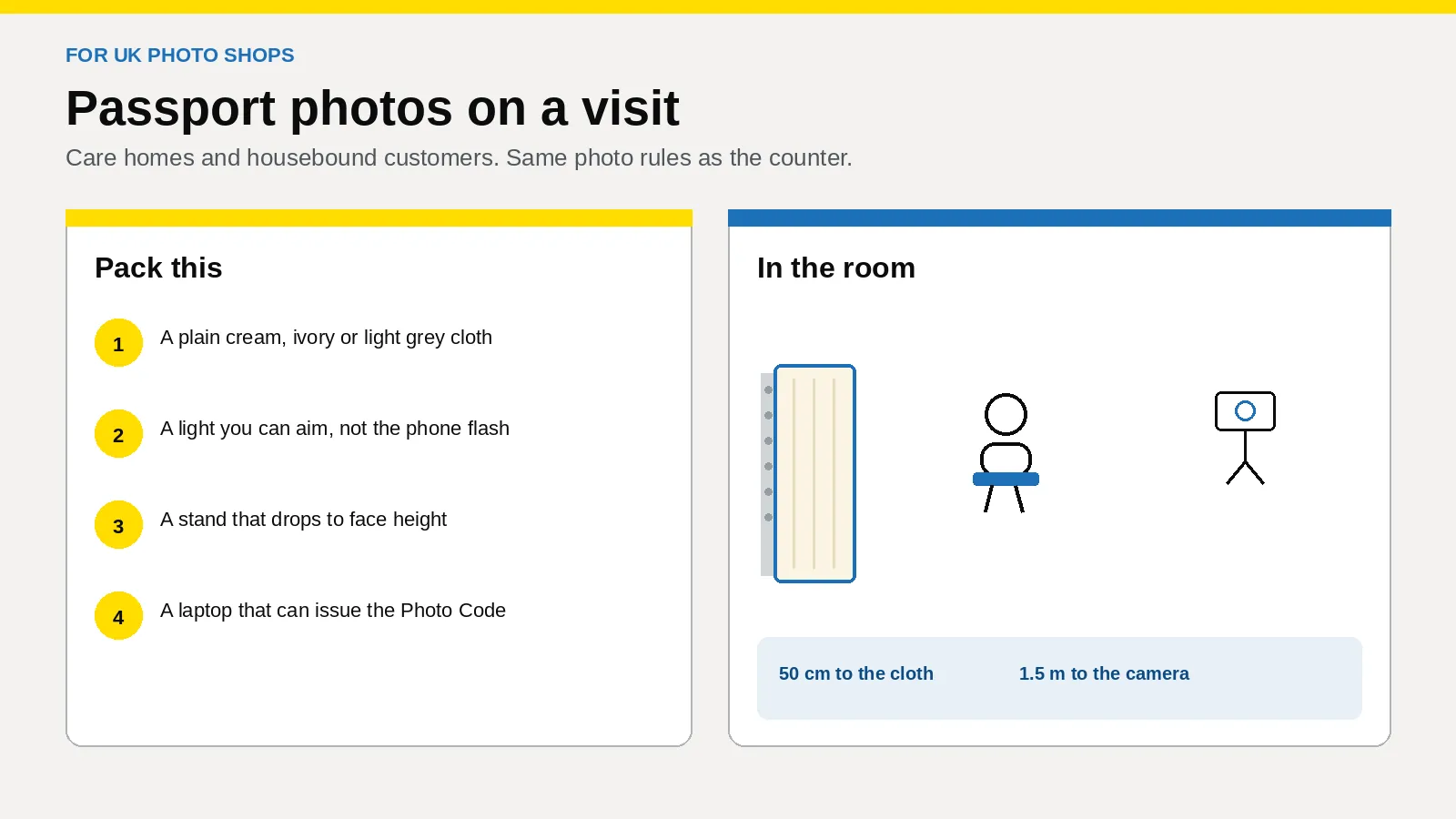
A UK photo shop can take a passport photograph in a care home, or at the home of a housebound customer. The rules do not change because the camera left the shop. You bring a plain light backdrop, light the face evenly, and issue a Photo Code on a laptop before you leave, so the code can be used for an HMPO online application.
This is a booked job for studios, camera shops and pharmacy counters. Passport Photo Code is independent of GOV.UK and HM Passport Office, and HM Passport Office makes the final decision on every photograph.
The rules are on photos for passports. Position and light are on how to take a digital passport photo. Examiner detail is in Photo standards (version 51.0, updated 4 March 2026). Checked on 24 October 2026.
Can a visit replace a trip to the counter?
Yes, when the person cannot reasonably come in and you can still make a photograph that meets GOV.UK photo rules.
Photos for passports offers a code from a booth or shop, or a photo on the applicant’s own device during the application. GOV.UK’s wording is that booth and shop photos are “more likely to be approved” than one taken on the applicant’s own device. A visit is your shop issuing a code. Do not shoot it on a personal phone and call it a shop job.
| Route | Where | Who checks first | What they leave with |
|---|---|---|---|
| Counter | Your backdrop | You, before they pay | A Photo Code, and prints if they asked |
| Booked visit | Their room, with your cloth | You, before you pack up | A Photo Code on their slip. Prints if you brought a printer, or a time to collect them |
| Family phone | Their wall, unchanged | The online form | An upload, not a code from your shop |
The counter version, without a booth, is in offering codes without a photo booth. This visit is for a British passport only. Licence photographs are a different job in Great Britain and in Northern Ireland: see can I use a passport photo code for my driving licence.
What do you agree before you travel?
Price the usual prints-and-code package using what to charge, then add the journey in writing. Do not invent the fee on the doorstep, and do not surcharge age, disability or being housebound. If a rule cannot be met because of a disability, follow the guide for elderly and disabled customers.
- Whose passport, and is it British? One person, one request. A corridor of residents is several jobs. A visa crop is a different product.
- Online, paper, or both? Online needs a Photo Code. A paper form needs prints 45 millimetres high by 35 millimetres wide, the size in Photo standards. The form says how many. The code does not replace them.
- Who types the code? Name them at booking. Hand the code over only if the applicant asked.
- When will they apply? The photograph has to be from the last month. Book the visit for when the form is about to start.
- What does the building require? Where to sign in, which room, and whether a member of staff stays. Do not hang a cloth in a shared lounge unannounced.
- Prints. If the printer stays at the shop, name who collects the sheet.
The £2.99 order on this website is for someone preparing their own photograph at home, and it includes the Photo Code and the digital passport photo. Someone you are visiting is a studio job. Use Passport Photo Studio.
What goes in the bag?
Take what you would refuse to shoot without at the counter.
- A plain cloth in cream, ivory or light grey, the examiner examples of a plain light background. Hang it flat.
- Clips or a stand you have already tested. Not a resident’s curtain rail.
- A light you can aim. A phone torch is not it, and the flash stays off because of red-eye.
- A tripod that drops to seated face height, or rises beside a bed.
- A shop camera or shop phone, portrait mode and beauty filters off, with no backup to a personal cloud. The habits in GDPR basics for passport photo shops apply in the room.
- A laptop on the studio workspace, plus a phone hotspot you have tested. Do not rely on the home’s Wi-Fi.
- Your usual slip, as in what to print on the receipt.
- A portable printer only if it already makes a sharp 45 by 35 millimetre print.
How do you set the room up?
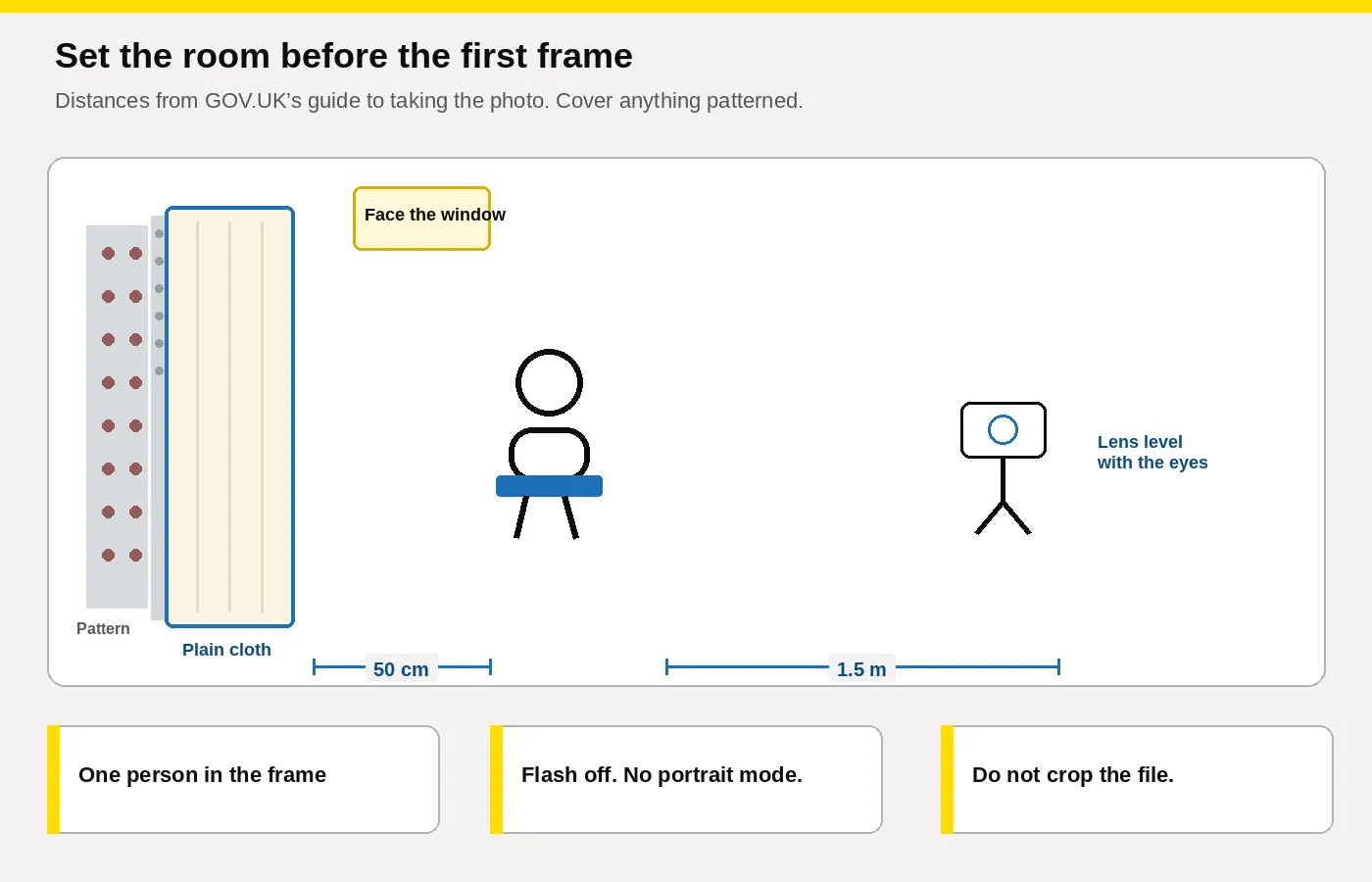
How to take a digital passport photo asks for a plain light background, nothing and nobody behind the person, no shadow on the face or on the background, about 50 centimetres from person to background, and about 1.5 metres from person to camera. Include the head, shoulders and upper body. Do not crop, and do not alter the file.
- Hang the cloth over wallpaper, a noticeboard, a headboard or a window in shot. If you are unsure whether a mark would show, cover it.
- Seat them about 50 centimetres in front of it, on a low-backed chair.
- Put the lens level with the eyes. If they are in bed, ask whether the head of the bed can come up. Do not use a patterned pillow as the background.
- Stand about 1.5 metres away. If the room is shorter, use a larger room the home has allowed, not a wide lens from the doorway.
- Light from the front: daylight, or your lamp a little above the eyes.
- One person only. A hand on the shoulder counts. Do not unplug equipment, and do not clone anything out.
- Check the sharpest frame at full size before you pack. Glasses and head coverings are in the shop guide. If the same fault is in every frame, change the room.
Which faults should you shoot again?
| What you see | What you do |
|---|---|
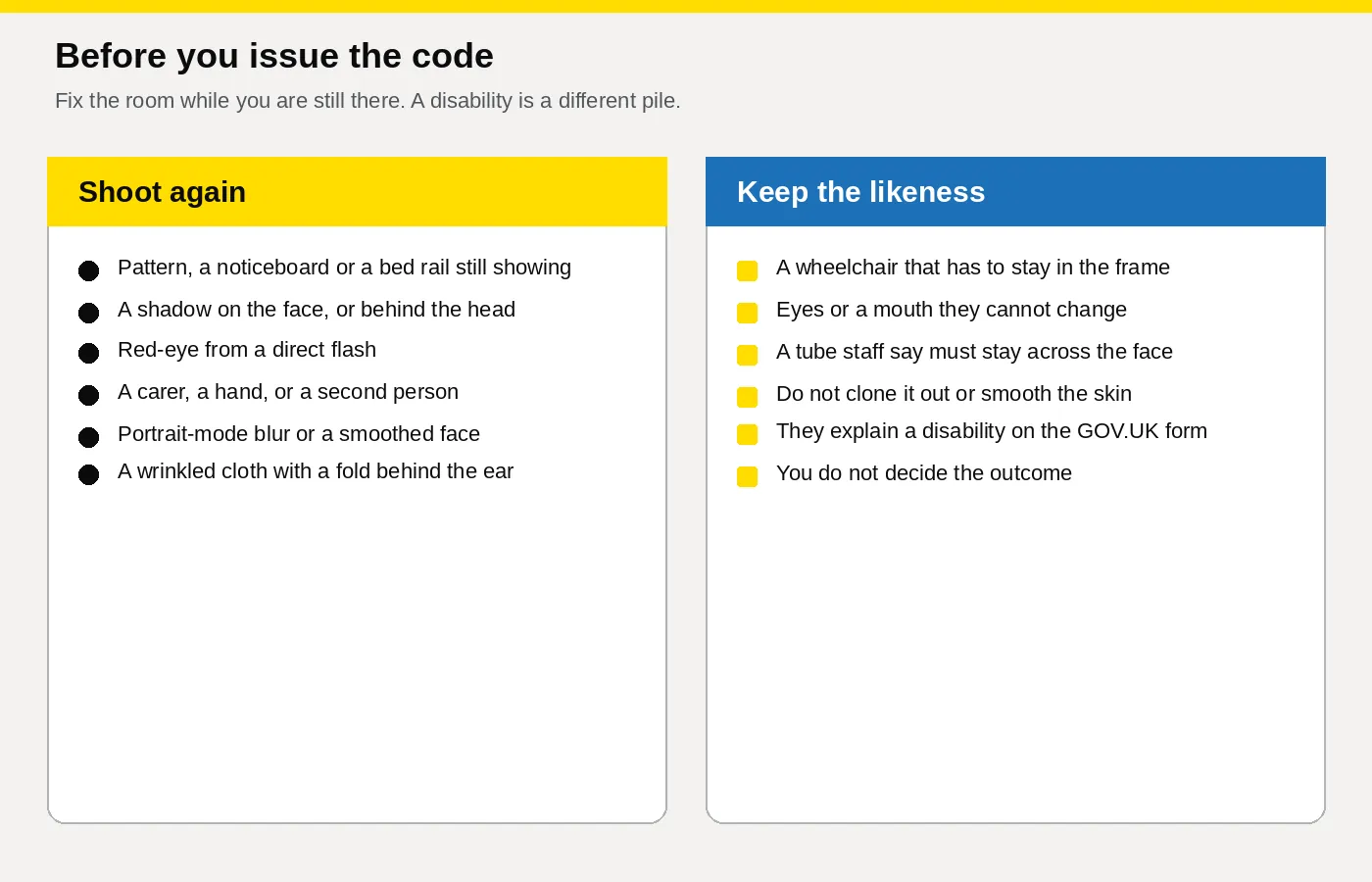
| Pattern, a noticeboard, a curtain or a bed rail | Move the cloth or the camera. |
| Shadow on the face, or behind the head | Turn them to the window, or move the light. Do not fix it in software. |
| Red-eye | Flash off. |
| Blur from portrait mode, or smoothed skin | Filters off. Lines and age spots stay. |
| Another person, or a hand | They step out. |
| Glare, or a frame across an eye | Glasses off if they can. Otherwise move the light. |
| Hair across an eye | Brush it clear, unless a religious or medical covering is why it is there. |
| A fold in the cloth | Pull it flat. |
| Wheelchair, a tube that must stay, eyes that cannot open, or a mouth that cannot close | Stop reshooting. See the next section. |
What if a disability is why a rule cannot be met?
Passport services if you’re disabled tells the applicant to explain it in the additional information and send a letter saying what the condition is and whether it is temporary or permanent. A letter from a doctor, a consultant, a carer or a parent carries more weight. The applicant can write it. You do not put a diagnosis on the slip, and you do not keep a copy.
Where a disability is the reason, examiner guidance may set aside gaze, eye position, mouth, expression, a square face to the camera, or a wheelchair showing against an otherwise plain background. The face still has to show. A short-term injury is not this route. Do not retouch the photograph, and do not decide the outcome.
If a tube crosses the mouth, ask whether it can sit clear for one frame. If it must stay, leave it. Seating and hearing aids are in the elderly and disabled customers guide.
How do you issue the code before you leave?
Check the frame on the laptop in the room. You cannot reshoot a shadow from the shop.
- Open Passport Photo Studio and upload the frame you would put your name to. It formats a digital passport photo to the UK specification. A flag means look again. It is not a decision by HM Passport Office.
- Shadow, a second person, red-eye or a filter: shoot again. Eyes or expression, where a disability is the reason they have given: keep the frame. Do not paint the eyes.
- Create the Photo Code. Show the photograph the form will retrieve to the person who will submit it.
- Read the code aloud. Watch 0 and O, and 1 and I. On the slip: the code, the date, your shop phone, and a line that HM Passport Office still decides. No room number and no medical detail.
- No signal: confirm the frame, upload on a connection you trust, and phone the named person the same day. Do not invent a code.
- Finish and name one slip before you start a second resident.
- Print now if the printer is with you. Otherwise confirm who collects the sheet. A paper form cannot use the code instead of the prints.
- Delete every spare frame. Do not photograph the corridor, and do not post the sitting.
That is the staff checklist, finished before you zip the bag. A code that fails to load later is the shop playbook.
Use a browser on the laptop you carried. Passport Photo Studio turns that one frame into a code, then a print sheet on the printer already at the shop. Pharmacies and camera shops use the same login at the till. Plans are on pricing, and the overview is for photo studios. A pack tied to a printer you cannot carry is the comparison in the studio software guide.
How do you start this week?
- Use the counter login on the studio overview, not a personal order.
- In the staff room, hang the cloth and photograph a colleague at the two distances above. Fix creases and shadows before you book anyone.
- Run that frame to a code in Passport Photo Studio, then to a print sheet on the shop printer.
- Write the booking note: whose passport, online or paper, who types the code, when they apply, what the building requires, how prints return, and the fee.
- Teach one sentence: “Type this on the online passport application and check the photograph is you. The code can be used for an HMPO online application. We are not the Passport Office. On a paper form, use the prints.”
Shop plans: pricing, or [email protected].
Frequently asked questions
Can a photo shop take passport photos in a care home?
Yes. Same GOV.UK photo rules as the counter, a cloth you brought, and a Photo Code before you leave. The code can be used for an HMPO online application.
Do housebound customers follow different photo rules?
No. It is still a photograph from the last month, unaltered, on a plain light background, with no shadow and nobody else in it.
What background should you use in a bedroom?
A plain cream, ivory or light grey cloth, about 50 centimetres behind them, camera about 1.5 metres away at eye level.
Who should receive the Photo Code?
The person named at booking, the one who will type it in. Not the care home office, unless the applicant asked.
Should the shop use the £2.99 online order for a visit?
No. That price is a Photo Code and a digital passport photo for someone at home. A customer you have travelled to is a studio job.
Should you charge extra because the customer is housebound?
Charge for the journey and the setup, agreed before you travel. Do not add a fee for age or disability.
What if a wheelchair or a medical tube is in the frame?
Move what staff say can move. Do not edit it out. If it has to stay, and the cloth behind is plain, keep the likeness. The applicant explains a disability on the form.
When should they apply?
Within a month. Book the visit for when the application is about to start.
Before the first booking
Pack the cloth, a light and a laptop. Shoot again for shadow, pattern, flash and extra people. Where the rules can be met, the digital photo should meet GOV.UK photo rules, with a Photo Code for an HMPO online application. Do not promise a result. Start at the studio overview.