How to set up a passport photo corner in a UK shop
How UK studios, pharmacies and camera shops should mark a passport photo corner: background, light, camera, print paper, and the Photo Code handoff.
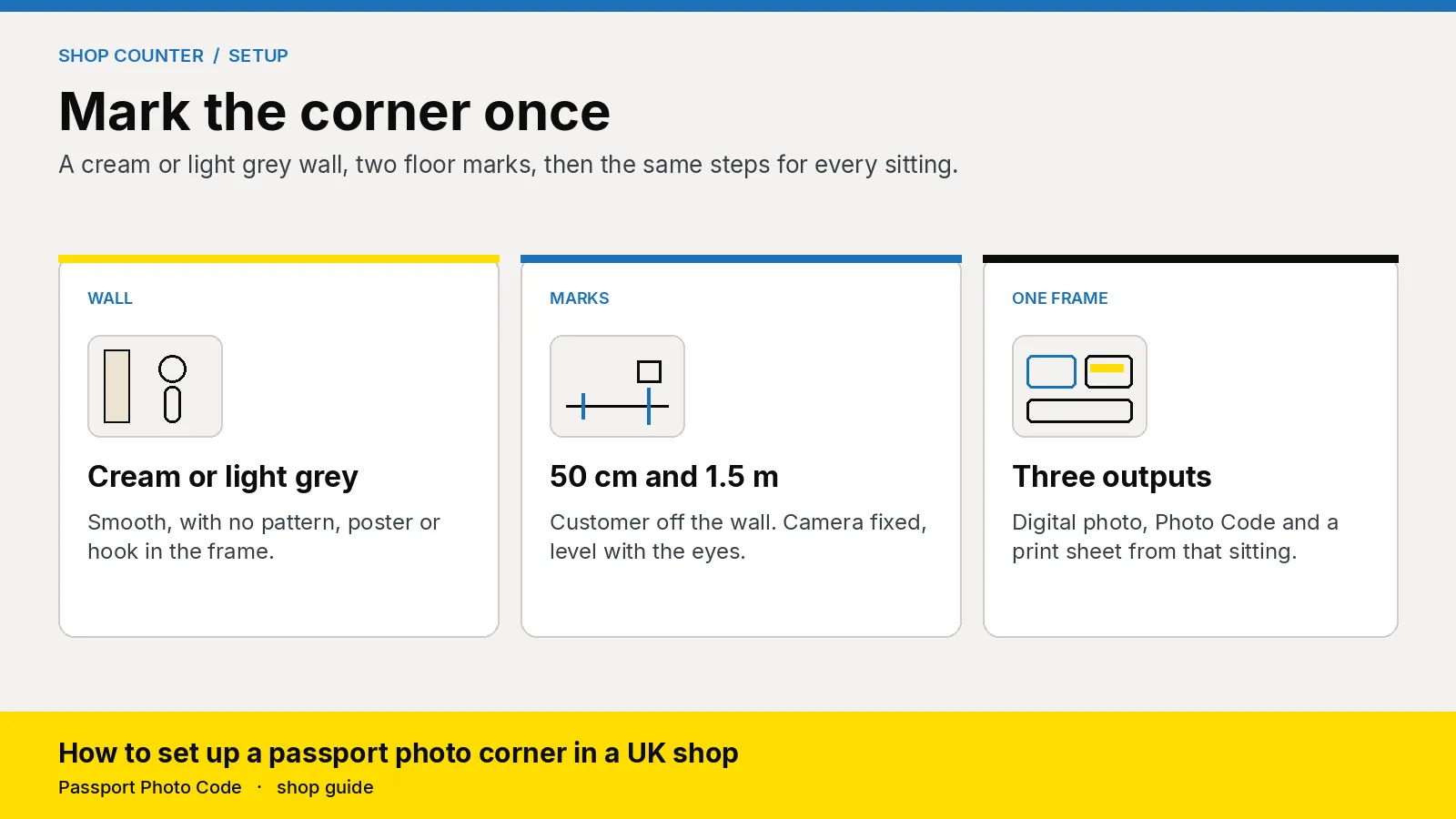
A UK photo shop should give every passport sitting the same corner: a plain cream or light grey wall, the customer about 50 centimetres in front of it, and the camera about 1.5 metres away at face height. From that frame you hand over a digital passport photo that meets GOV.UK photo rules, a Photo Code the customer can use for an HMPO online application, and a print sheet when they want paper.
Updated 28 October 2026. Passport Photo Code is independent of GOV.UK and HM Passport Office. HM Passport Office makes the final decision on every photograph. Distances are from how to take a digital passport photo. Background and print size are from photos for passports and printed photos. The examiner notes below are from Photo standards (version 51.0, updated 4 March 2026). Checked on 28 October 2026. If an official page changes, it wins.
Why does the corner have to be marked?
A booth hides the background inside a cubicle. The faults that come back are layout faults: a poster at the edge, a shadow of the head, a ceiling spotlight, portrait mode left on. Tape and a fixed camera stop Saturday staff from inventing a new layout each time.
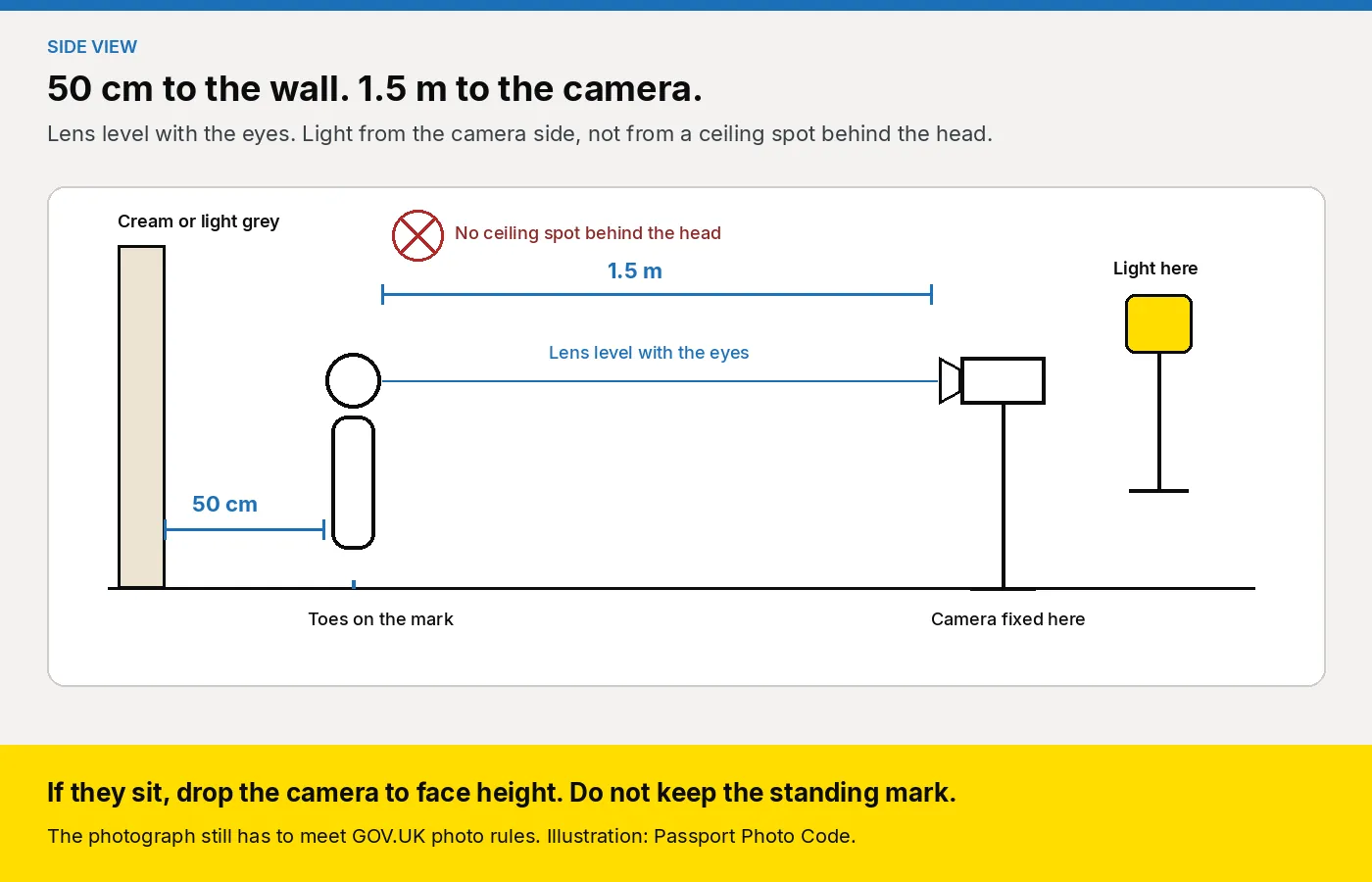
How to take a digital passport photo tells the public to stand 50 centimetres from the wall and to put the photographer 1.5 metres away. Remeasuring by eye misses both once the queue starts. Mark them once. That is the metre of wall on the pharmacy page, and the backdrop a camera shop often has up already. Photos for passports says a photograph from a booth or shop is more likely to succeed than one taken on the customer's own device during the application. HM Passport Office still examines the photograph after they submit.
What should the wall be?
Use a smooth cream or light grey surface, with no pattern and nothing else in the frame. That is the colour that works for the digital file and for the prints.
| Source, checked 28 October 2026 | What it says about the background |
|---|---|
| Digital photos | A plain light-coloured background, clear contrast with the face, no other objects or people, no shadow on the face or behind the person |
| How to take the photo | A light grey or cream wall works best. No texture, no pattern, no object behind them |
| Printed photos | Plain cream or light grey |
| Photo standards, for examiners | Any plain light colour, including cream, ivory, vanilla and light grey. A light texture such as woodchip only if no mark would show in the passport |
Hang or paint cream or light grey if you also sell prints. A brilliant white wall next to a pale face loses contrast. Woodchip is a gamble, because a mark can show in the passport when it looks faint on your screen. Cover any poster, and smooth creases. A hook, a shelf or a crease through the head is a mark.
Where do you put the tape?
- Tape the floor 50 centimetres out from the wall. A standing customer puts their toes there. The gap keeps their shadow off the wall.
- Tape a second mark 1.5 metres further into the shop, and fix the camera there on a stand, level with a typical adult's eyes.
- Keep a chair, and drop the camera to face height for anyone who sits. Seating and hearing aids are in passport photos for elderly and disabled customers.
- Ignore both marks for a baby. Photos for passports says a baby under one lies on a plain light sheet and is photographed from above. Use the baby and child counter guide, on a low surface.
Leave the head, shoulders and upper body in the frame. The taking guide says not to crop it yourself. Upload the full frame and let the workspace crop. A tight square, or a white, grey or black bar along the edge, is the wrong file. Photo standards, updated 4 March 2026, tells examiners to ask for a new photograph when that bar shows, including on a child's.
How do you light a shop with ceiling spots?
The taking guide prefers daylight and no shadow on the face or behind the head. Put the shop light on the same side as the camera. A ceiling spot behind them prints the head on the wall, and a spot above them puts hollows under the eyes. Keep the flash off. Photo standards describes red-eye as a red circle or crescent over the eye, and treats it as a fault.
Photograph a colleague on the tape and look at the wall at full size. A dark copy of the head means move the light and shoot again. Do not paint it out. The public rules say the photograph is unaltered. Examiner guidance is softer about editing out a shadow, and firmer about any change to the face. Do not guess that line at the till. Turn portrait mode and beauty filters off, including on the home screen a locum will see.
What should the camera leave alone?
Use the rear camera, or a normal lens. A front-camera picture at arm's length widens the face, and Photo standards treats a mirrored file as a problem because the likeness is reversed. If someone arrives with a close selfie, a filter, or a busy room behind them, stand them in the corner.
Turn the date stamp off. Photo standards gives a date stamp as a sign the photograph may be older than a month, and the file has to be from the last month. Headphones and a collar over the chin come off. A school or military uniform can stay: Photo standards calls that a personal choice. A visible hearing aid stays. Glasses are in the glasses and head coverings guide. Keep the shop logo on the slip, not on the photograph.
Which faults mean you shoot again?
Look once, at full size, before you take the money.
| What you see | What you change |
|---|---|
| A shadow of the head on the wall | Move the light or the person. The 50 centimetre gap is there for this |
| A poster, hook, shelf or door frame | Move them, or drop the plain cloth and smooth it |
| Portrait blur or a beauty filter | Turn it off and shoot the original frame |
| Red-eye | Flash off, then another frame |
| A second person, a hand or a bag | Clear the frame. Cropping them out is the wrong repair |
| A bar along the edge, or a file you already cropped | Shoot the full head, shoulders and upper body again |
| A smile, or hair across an eye | Plain expression, mouth closed, hair back. Under six, expression and gaze can differ. Under one, the eyes may be shut |
A flag in the studio preview means look at that row. It is not HM Passport Office's decision.
What paper goes in the printer?
An online application needs the digital photograph. A paper form needs prints. The Photo Code does not replace them. Many customers buy both, and both should come from the same frame.
Printed photos says two identical prints, 45 millimetres high by 35 millimetres wide, on plain white photographic paper with no border, not a cut-down larger picture. The head is 29 to 34 millimetres from crown to chin. They go in the envelope loose. Photo standards adds that glossy or textured paper can haze when the print is scanned, and that a watermark which shows on the scan is a fault. Where a renewal needs only one print and there is no countersignature, a second print is not required. Read the form. Most paper forms still ask for two.
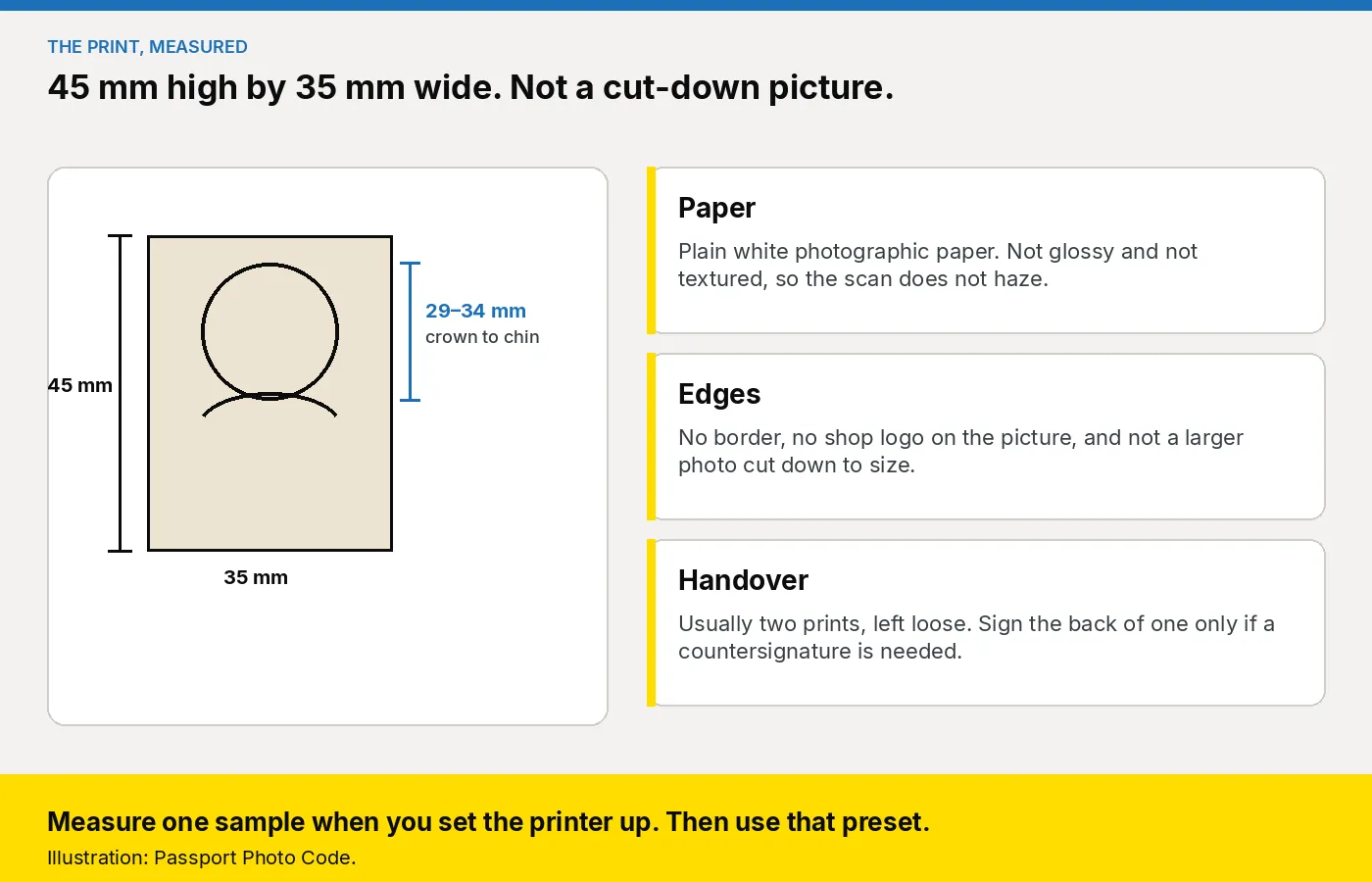
Print from the studio workspace, on the printer you already own, so the sheet matches the coded photograph. If the minilab default is high gloss, switch the passport job to a finish that will not glare when scanned. Measure one sample, then keep that preset. If a countersignature is needed, sign one print on the back only. The rest of the slip is in what to print with the Photo Code.
How do you take one customer through it?
The £2.99 order on this website is a Photo Code and the digital passport photo for someone at home. A walk-in is a studio job. Someone who wants to take the picture themselves can use how to take a passport photo at home. At the till, use the shop login.
- Say the package price before anyone stands on the mark. Prints plus a Photo Code is the usual line. How to set the card is in what to charge for prints plus a code.
- Ask whether they need the code, the prints, or both. Look at glasses, a head covering, uniform and headphones before you shoot.
- Stand them on the 50 centimetre mark, or seat them and drop the camera. Full frame, rear camera, flash off.
- Open Passport Photo Studio on the till browser and upload that frame. The workspace formats a digital passport photo to the UK specification.
- If the preview flags a shadow, a second person, red-eye or a filter, shoot again. Do not retouch the face.
- Create the Photo Code, read it aloud, and write the code, the date, the shop phone and "UK passport, GOV.UK" on the slip. Watch 0 and O, and 1 and I.
- Print the sheet from that same job when they want paper. Tell them to type the code when the form asks, check the photograph is them, and remember HM Passport Office still decides. The screens are on using a photo with a code.
The short version to pin beside the camera is the staff checklist.
What should you look for in the software?
The tool has to open on the till and give a locum the same steps as the manager. Wider buying points are in the studio software guide.
- Three outputs from one frame. A digital photo that meets GOV.UK photo rules, a Photo Code for the HMPO online application, and a print sheet on the printer you already own.
- No retouching step. Formatting to the UK specification is the job. Painting a background or smoothing a face is not.
- A locum login. If the trained colleague has gone home, decline the job rather than guess the layout.
- A cost that follows real sittings. Compare a quiet month with an annual code pack on pricing. The price on your door stays yours. Plans are quoted for locations and volume.
How do you start this week?
- Open Passport Photo Studio from the studio overview. Use the shop login.
- Hang or paint the board. Tape 50 centimetres and 1.5 metres. Fix the camera at face height.
- Photograph a colleague. Fix the poster, the crease and the shadow in the room, then run that frame to a Photo Code and a print sheet.
- Measure one print, read the code aloud, and pin the fault table by the camera.
- Shop plans are on pricing, or email [email protected].
Frequently asked questions
What colour should a UK passport photo corner be?
Cream or light grey, smooth, with no pattern. Those colours are named for printed photos, and the taking guide says they work best. A shop that sells prints should not rely on a brilliant white wall.
How far from the wall should the customer stand?
50 centimetres, with the camera 1.5 metres away and level with the eyes. Mark both on the floor. If they sit, drop the camera to face height instead of using the standing mark.
Can staff remove a shadow or a poster in software?
No. Shoot again. The public rules say the photograph is unaltered. Do not smooth the face, change a hairline, or paint in a new background at the till.
What size and paper should the prints be?
45 millimetres high by 35 millimetres wide, head 29 to 34 millimetres from crown to chin, on plain white photographic paper with no border. Not glossy, not textured, and not a larger picture cut down. A paper form usually needs two, sent loose.
Do customers have to change out of school uniform?
No. Photo standards treats a school or military uniform as a personal choice. Headphones and a collar over the chin come off. A visible hearing aid stays.
Does the Photo Code replace printed photos?
No. The code can be used for an HMPO online application. A paper form still needs the prints. Offer both from the same frame when they want paper as well.
Should the shop use the £2.99 order for a walk-in?
No. That price is one Photo Code and the digital passport photo for someone taking their own picture at home. A counter customer is a studio job. Plans are on the pricing page.