UK passport photos for elderly and disabled applicants
Age does not change a UK passport photo. A disability changes it only when a rule cannot be met. How to sit for the picture, what to explain, and the letter to send.
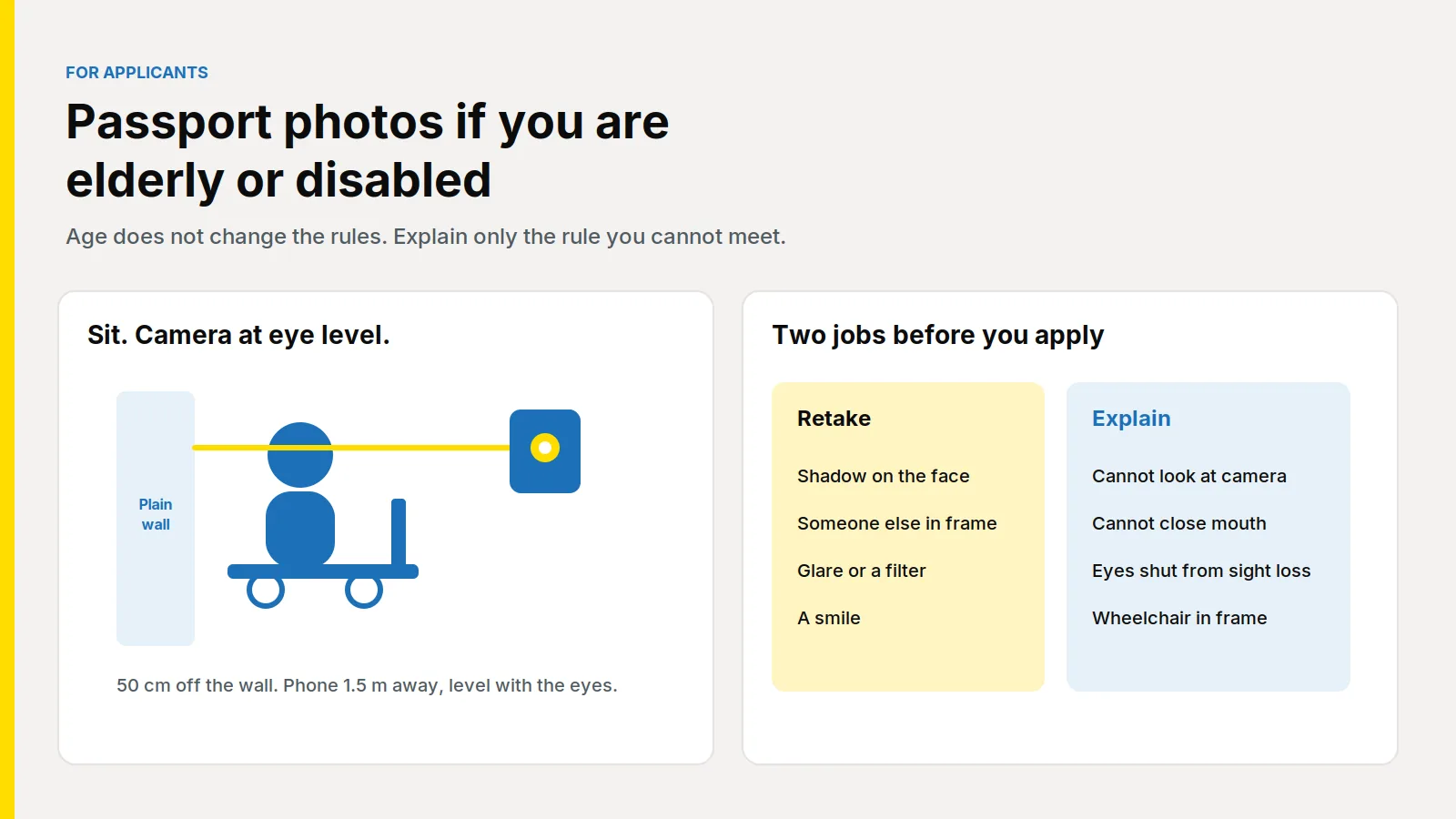
Being older does not change the rules for a UK passport photograph. You still need a new picture from the last month, on a plain light background, with a clear face and nobody else in the frame. A disability changes the photograph only when that disability is the reason a rule cannot be met: gaze, the eyes, the mouth, expression, a square-on face, or a wheelchair that has to stay in the picture. A shadow, a helper, glare and a filter are faults you fix first.
Updated 29 October 2026. Passport Photo Code is independent of GOV.UK and HM Passport Office. HM Passport Office makes the final decision on every photograph. The applicant page is passport services if you're disabled. Photo rules are on photos for passports. Distances are on how to take a digital passport photo. Examiner detail is in Photo standards, version 51.0, published for Home Office staff on 19 January 2026. The publications page was last updated on 4 March 2026. Checked on 29 October 2026.
Does being older change the UK passport photo rules?
No. Grey hair, lines and age spots are the likeness. Photos for passports says a new passport needs a new photo from the last month, even if you look the same, and that the file must be unaltered. Do not smooth skin, edit out a hearing aid, or scan the picture in your current passport.
A renewal or a change of name still needs that new photograph. See do you need a new photo to renew or change the name. Under-6 expression rules are age rules, in UK passport photos for babies and young children, not a reason for an adult to smile.
Which rules can a disability set aside?
Photo standards is written for examiners. Section 5.1 says a physical or mental disability that stops you meeting the standards may lead to an exemption when it is clear from the photo or the application, or when a written statement comes from you, a parent, a carer or a doctor. An examiner may set aside eyes looking at the camera, eyes in the correct position, a closed mouth, a neutral expression, a full face toward the camera, and a background that is otherwise plain but shows a medical aid such as a wheelchair. The photograph still has to capture your face. The examiner decides. You do not.
Section 5.2 covers sight. Eyes shut because you are blind or partially sighted, and a permanent or long-term eye patch, may still be considered. A temporary eye patch is not treated the same way. Tinted glasses come off. Do not ask anyone to hold your eyelids open.
An open mouth that changes the face is a fault. A relaxed mouth can still meet the ordinary rule when the features are not distorted, and a condition that stops the mouth closing is named separately. A wide smile is not that condition. A black eye is not this route: section 5.3 says a temporary injury is not a reason to set the standards aside, so do not paint it out.
What should you still retake?
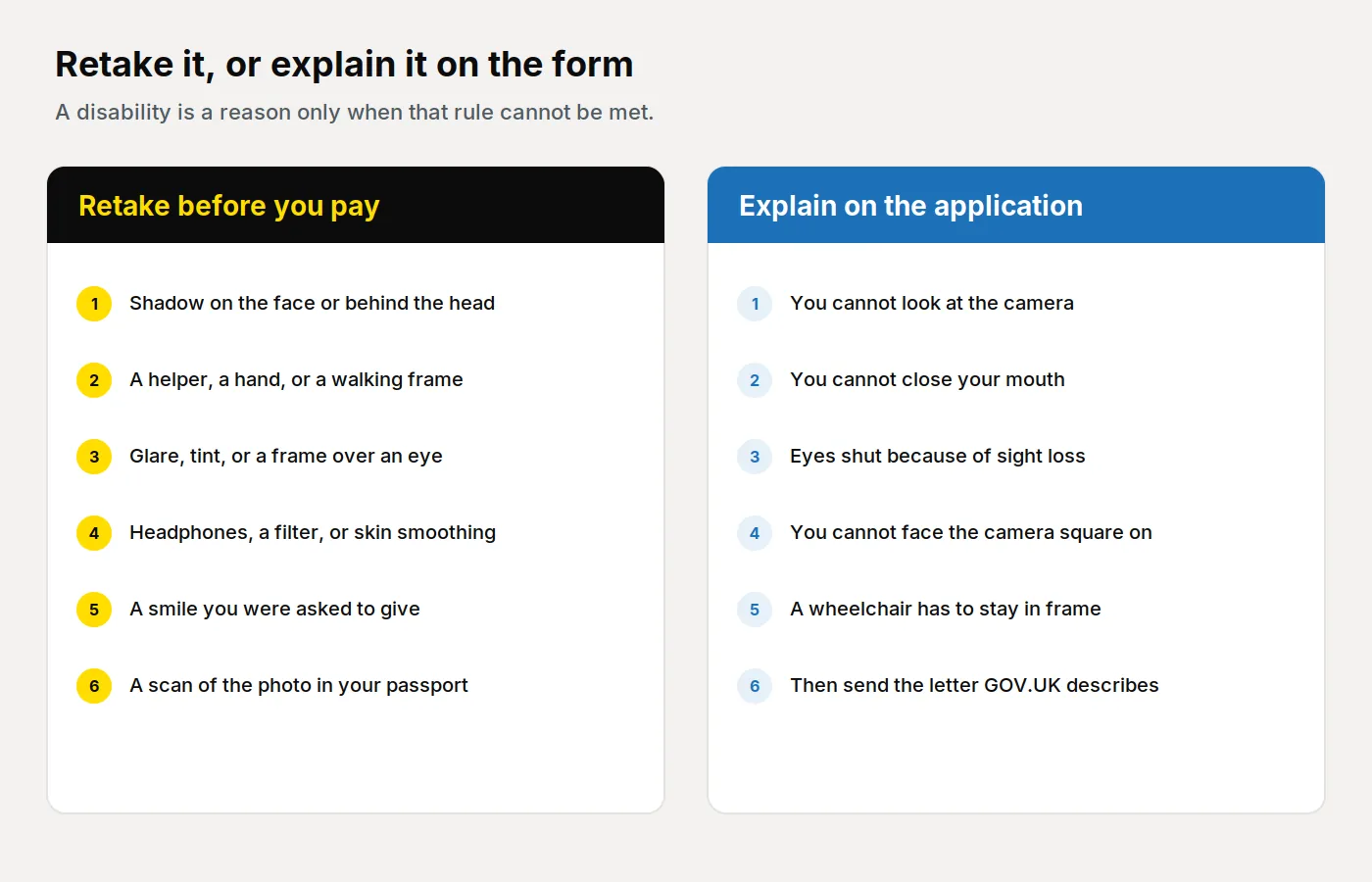
Sort the picture before you pay anyone or open the form. One pile is a fault you can remove. The other is an explanation, and only when a disability is the reason.
| What you see | What you do |
|---|---|
| Shadow on the face, or a hard shadow behind the head | Move the chair or face the window, and take it again. |
| A helper, a hand, or a walking frame beside you | They step out. The photograph is of one person. |
| Glare, tint, or a frame across the white of an eye | Glasses off if you can. Otherwise turn until the lenses are clear. |
| Headphones, earbuds, or a filter | Off. A hearing aid stays. Leave portrait mode and skin smoothing off. |
| A smile, so you would look friendly | Take it again with a plain expression. |
| You cannot look at the camera, close your mouth, open your eyes, or face square on | Keep a true likeness. Explain it on the form, and send the letter. |
| A wheelchair has to show | Leave it. Keep the wall behind you plain. |
Photos for passports says photos that miss the rules delay the application, and that a booth or shop photograph is more likely to succeed than one you take yourself. Ask a shop for the camera at face height. A standing booth looks down on a chair. See how shops photograph elderly and disabled customers.
How do you take the photo if you need to sit?
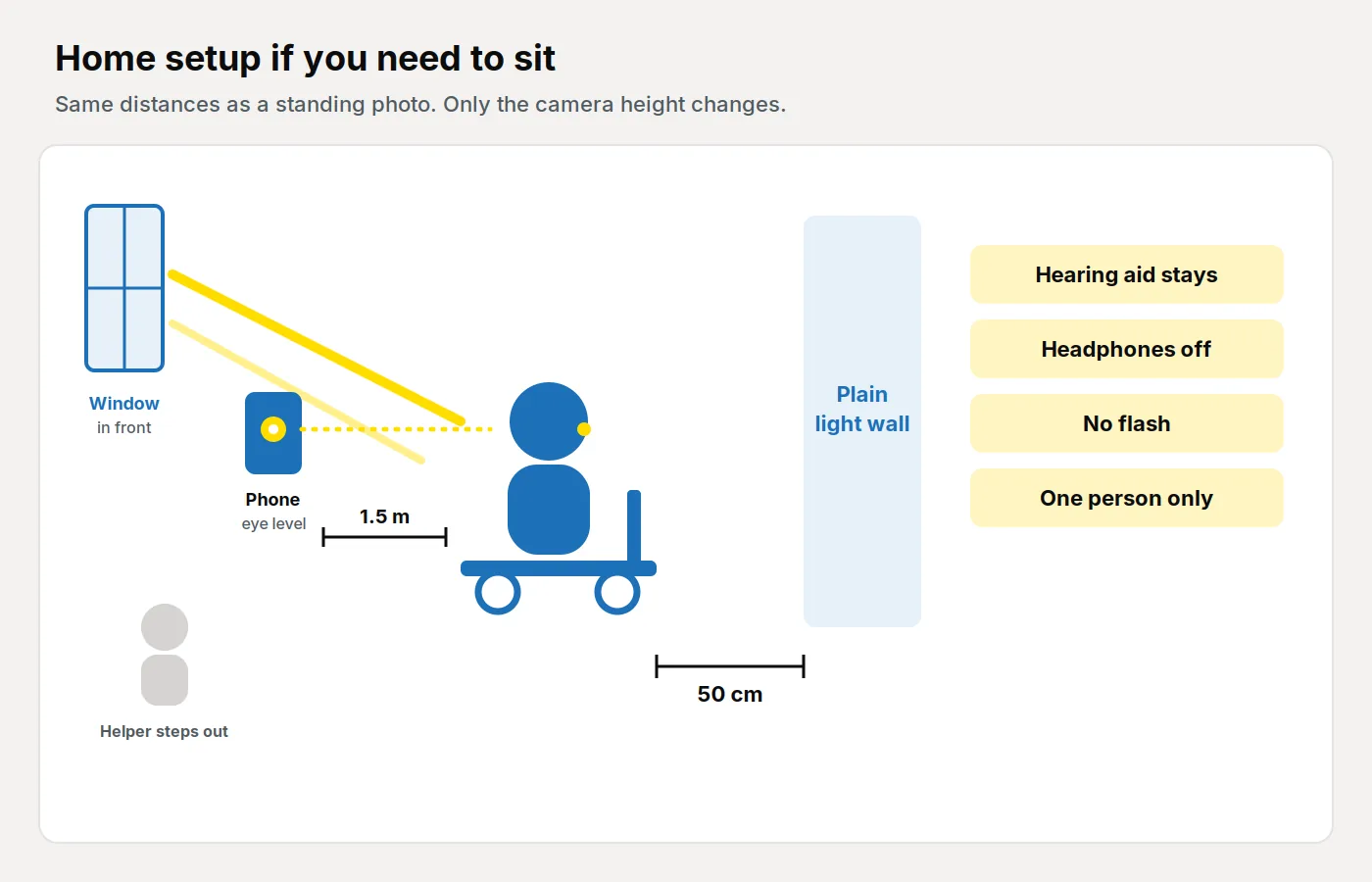
How to take a digital passport photo puts you 50 centimetres from the background and the camera 1.5 metres away, facing a window, with head, shoulders and upper body in the frame. Sitting uses the same distances. There is no separate chair measurement, so lower the camera instead.
- Use a plain cream, ivory or light grey wall, or a plain sheet. Pattern, a busy chair and a high patterned back will show. White hair on a white wall needs light grey or cream, not a lamp behind you.
- Sit about 50 centimetres off the background. If a wheelchair needs more floor, move the sheet and keep the gap. A shadow under the chin can stay. A shadow on the cheek is a retake. Face the window, with the ceiling light and the flash off.
- The helper uses the rear camera, about 1.5 metres away, level with your eyes. A phone above you tips the chin up, and an arm's-length shot widens the face. Alone, use a timer with the phone at that height.
- The helper steps out. A hand on your shoulder is another person. Digital photos say no other objects or people. Do not crop. Leave a tube that must cross the mouth, and say so. Then check eyes, shadow and the chair at full size.
More of the ordinary room is in how to take a UK passport photo at home. A file you upload yourself on GOV.UK must be in colour, unaltered, at least 600 pixels wide and 750 pixels tall, and between 50KB and 10MB. You do not resize it for this site.
What can you wear?
A hearing aid stays. Examiner guidance tells staff not to turn a photograph away because one is visible. Earphones, earbuds and over-ear headphones come off.
Glasses come off unless you have to wear them. No sunglasses or tint, and no frame over the white of the eye or the pupil. Glare is a retake: turn until the window is not a bright block in the lenses. Visually impaired and blind applicants remove tinted glasses, and use a clear pair or none for one frame if they can.
A head covering stays only for a religious or medical reason, with the face from chin to forehead visible. A daily scarf or bandage for surgery, illness or hair loss can stay. A fashion hat comes off. If the reason is unclear, you may be asked to write that it is part of daily dress. A pale covering on a white wall needs the grey or cream sheet.
A wheelchair may show. That is the example in section 5.1. Do not crop your head to hide it, and do not stand if standing is unsafe. Leave a walking frame out for one frame if you can. If you cannot, keep the wall plain and explain it.
What do you write, and when does the letter go?
Passport services if you're disabled says that if a disability means you cannot meet the photo rules, you give details and send evidence.
Online, the photo is checked automatically. Photo standards says the check looks for the eyes. When it finds them, the digital photo passes that check. When it does not, retake the picture, or submit it and type the reason in the free-text field. The examiner still decides. Go past the message only when a disability is why the rule cannot be met. A shadow is a retake.
Explain in the additional information. Send a letter with your name, the condition, whether it is temporary or permanent, and the rule you cannot meet. Date and sign it. GOV.UK lists a doctor, a consultant, a carer or a parent, and says you can write it yourself. Do not describe a shadow, a smile or a filter as a medical condition.
Do not post the letter with the first click. After you submit, the person confirming your identity is emailed. After they confirm, you are told which office receives the letter.
On paper, explain in section 8 and enclose the letter with two identical prints, 45mm high by 35mm wide, sent loose. The head is 29mm to 34mm from the top of the head to the chin, on plain cream or light grey, as printed photos sets out. A Photo Code does not replace those prints.
A first adult passport needs a different letter if you cannot attend the identity interview because of a mental or physical condition: from a doctor or consultant, plus section 8 on paper. That letter is about the interview. The online identity check is an email, not a signature on a print. See the first adult passport photo guide.
What other help does the passport office list?
The same page covers the visit as well as the photograph. Every Passport Customer Service Centre has wheelchair access. Some have an accessible toilet. Where they do not, staff can take you to one. Check the centre you would use.
Deaf and hard-of-hearing applicants can book sign-language help, an induction loop and a quiet room through the Passport Adviceline. Blind and partially sighted applicants can ask for braille, audio or large print, or apply by phone. The form still comes back with a space for the photographs, so the call does not replace the photo. A braille sticker can be added when you apply. This site does not run the Adviceline.
How do you get a Photo Code from home?
Use a code when you are applying online and want the file ready before you open the form. You can also take the picture inside the GOV.UK form with a helper.
From the homepage, choose Create my photo & code, or open the create page. The same order is on online passport photos. We check and format the upload so that it meets GOV.UK photo rules. The price is £2.99 once, for the Photo Code and the digital passport photo together. The code can be used for an HMPO online application. The passport fee is paid separately to HM Passport Office.
- Take the photograph first, uncropped, with filters off.
- Upload it and look at the preview. Retake a shadow, a second person, hair across an eye, or a smile before you pay. If a disability is the only reason a rule cannot be met, keep that frame. Do not paint eyes open or remove a wheelchair.
- Pay once. Copy every character, including the dots, and download the digital photo.
- On the form, choose a photo with a code and confirm the picture is you. The box is in what a UK passport Photo Code is and on the GOV.UK page for a photo with a code.
- Add the explanation if you need it, and send the letter when the email names the office. Photos are kept for as long as the service needs them, normally 48 hours. The same path is on how it works.
The code retrieves the photograph. It does not decide whether a standard is set aside.
Frequently asked questions
Does being older change the UK passport photo rules?
No. You still need a new photograph from the last month. Keep grey hair and lines, and do not smile to look friendly.
Can I sit, or stay in a wheelchair, for the photo?
Yes. Stay about 50 centimetres from a plain light wall, with the camera about 1.5 metres away at face height. A wheelchair may show.
Can I wear a hearing aid in a UK passport photo?
Yes. Leave it on. Headphones, earbuds and over-ear headphones come off.
What if I cannot look at the camera, close my mouth, or open my eyes?
Keep a true likeness, explain it in the additional information, and send a letter naming the condition and whether it is temporary or permanent. Eyes shut from sight loss may still be considered. A black eye is a different case, and tinted glasses come off.
Who writes the letter, and when do I send it?
You can write it yourself. GOV.UK also lists a doctor, a consultant, a carer or a parent. Online, send it after the email names the office. On paper, enclose it and explain in section 8.
Does the Photo Code settle the disability exception?
No. It can be used for an HMPO online application so the form can retrieve the photograph. You still add the explanation and the letter. HM Passport Office makes the final decision.