UK Passport Photo Code vs. Digital Upload: Which Method to Use?
Stuck at the 'How do you want to add your photo?' stage of your UK passport application? This guide compares photo codes and digital uploads, fixes common submission errors, and explains why the GOV.UK checker sometimes gives misleading warnings.
If you’re currently staring at the 'How do you want to add your photo?' page of your GOV.UK passport application, you’ve reached a fork in the road. You can either enter a UK passport photo code or upload a file directly from your device. It sounds straightforward, but this is exactly where many applications stall due to technical glitches.
Understanding the mechanics of a UK passport photo code is essential for a smooth submission. Whether you’re at a high-street booth or using your smartphone at home, here is how to navigate the submission stage without the headache of unexpected rejections.
Code or Upload? The 30-Second Verdict
Your choice depends mostly on your location and how much technical control you want over the process:
- Use a Photo Code if you are in the UK and prefer using a high-street booth (like Photo-Me/ME Group) or a professional studio. It’s a ‘hands-off’ method where the provider ensures the technical specs are met before you even leave the shop.
- Use a Digital Upload if you are applying from abroad, taking the photo yourself, or using a specialized online tool like Passport Photo Code to turn a smartphone snap into a compliant file.
The Bottom Line: A code is a retrieval key for a photo stored on a private server. An upload is you handing the digital file directly to HM Passport Office (HMPO). Both methods are perfectly valid if the image meets the strict GOV.UK digital photo rules.
How a UK Passport Photo Code Actually Works
When you use a booth or a shop, they don't usually give you a JPEG on a USB stick. Instead, they provide a slip of paper with an alphanumeric string. This is your retrieval key.
The 'Luggage Tag' Logic
It’s a common mistake to think the code is the photo. It isn’t. Think of it as a luggage tag. Your photo sits on a secure server owned by the booth company or the photographer. When you type that code into the GOV.UK site, the government’s system 'calls' the provider’s server to fetch the image.
This explains why a code might fail even if you’ve typed it correctly. If the provider’s server is down or the digital 'handshake' between the two systems fails, HMPO cannot see your picture.
Typical Formats and Major Providers
Most codes are between 12 and 16 characters long. In the UK, the dominant provider is Photo-Me, but several online services also generate these codes. It’s important to realize that HMPO does not issue these codes—private companies do. If your code doesn't work, GOV.UK staff cannot fix it; you must contact the company that issued it.
The Direct Digital Upload: Taking Control of the Process
Uploading a photo yourself gives you more control, but you’re essentially acting as the technician. The GOV.UK system is programmed to reject files that don't meet exact criteria before a human even looks at them.
Pixel Counts and Aspect Ratios
To pass the initial automated gate, your file must meet these standards established by the ICAO standards for biometric documents:
- Dimensions: At least 600 pixels wide by 750 pixels high.
- Aspect Ratio: 4:5. Standard smartphone photos are often 3:4 or 16:9, which can cause the system to reject the file or crop it awkwardly.
- File Size: Between 50KB and 10MB.
- Format: JPG or JPEG is the most reliable, though PNG is generally accepted.
Comparison: Cost, Convenience, and Reliability
| Feature | Photo Code (Booth/Studio) | Digital Upload (DIY/Online Tool) |
|---|---|---|
| Typical Cost | £10 - £15 | Free to £7 |
| Location | Requires a trip to the shops | Can be done from home |
| Risk | Server connection issues | Incorrect cropping or file size |
| Best For | UK-based applicants | Expats and families with toddlers |
Troubleshooting: When the System Says No
It is frustrating to pay for a photo only to see 'Code not recognised.' Before assuming the code is invalid, try these common technical fixes.
Fixing 'Code Not Recognised'
Almost 90% of UK passport photo code errors are simple typos. Digital systems struggle with 'look-alike' characters. If your code is failing, check for these common mix-ups:
- The Number 0 vs. the Letter O
- The Number 1 vs. Capital I vs. Lowercase l
- The Number 5 vs. the Letter S
- The Number 2 vs. the Letter Z
If the code still fails, check the date. While many codes last 30 days, some providers only keep photos for 48 hours to comply with strict data protection guidance.
Server Timeouts and Expired Codes
If your code is correct and recent, there might be 'server lag.' If the provider's database is undergoing maintenance, HMPO cannot retrieve the file. Wait two hours and try again. If it still doesn't work, ask the provider for the raw JPEG file and use the 'Upload' method instead.
Interpreting the GOV.UK AI Checker
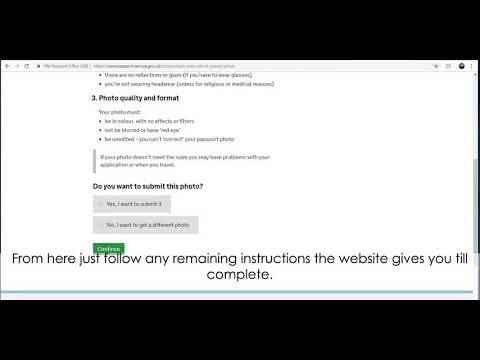
Once your photo is entered—via code or upload—the GOV.UK automated checker will scan it. It uses AI to locate your facial features and detect background shadows.
You might see a warning: 'Your photo may not be accepted because your background is too dark.'
Do not panic. This checker is extremely cautious. If you can see that your background is a plain, light grey or cream and there are no shadows on your face, you can usually click 'Use this photo anyway.' However, if the checker says it cannot find your face, you must retake it; that is a hard rejection from the system.
The Expat Problem: Applying from Outside the UK
For British nationals living abroad, getting a UK passport photo code can be difficult. You won’t find a UK-compatible 'Photo-Me' booth in many countries.
Expats often make the mistake of using a local photographer who provides a file formatted for a local passport (like the US 2x2 inch format). These will likely be rejected because the head-to-height ratio differs from British requirements. If you are applying from overseas, follow the specific GOV.UK guidance for overseas applications.
Privacy: What Happens to Your Data?
If you use a code, your photo sits on the provider's server. Reputable services like Passport Photo Code only retain your photo for a short window—usually 48 hours—to ensure you have time to complete your application while maintaining privacy. Once submitted, the photo is stored in HMPO’s secure database. If you are privacy-conscious, the 'Direct Upload' method is technically more 'direct' as it avoids third-party server storage beyond the initial processing.
Frequently Asked Questions (FAQ)
Can I scan a printed photo and upload it?
It is not recommended. Scanning a physical print usually introduces 'noise' or graininess that the GOV.UK AI will flag as low resolution. You should always use the original digital file.
I have a beard now but didn't in my last passport. Is that okay?
Yes. The facial recognition software focuses on bone structure and the distance between features like your eyes and nose. Hair changes do not usually trigger rejections as long as your face is clear and unobstructed.
My code was accepted, but I noticed a shadow. Can I change it?
If you have already paid for the application, you cannot change the photo online. However, if HMPO decides the photo is unsuitable, they will email you a link to upload a new one. This will delay your application but will not result in an outright rejection of your passport request.
Summary Checklist for a Successful Submission
Before you finish your application, run through this final check to ensure your UK passport photo code or upload is perfect:
- The Background: Is it plain, light-coloured, and free of textures or shadows?
- The Lighting: Is your face evenly lit? Shadows behind the ears are a common reason for human rejection later in the process.
- The Code: Have you double-checked '0' vs 'O' and other similar characters?
- The Crop: Do not crop the photo too tightly. The HMPO tool prefers a bit of space around your head so it can perform the final biometric alignment automatically.