UK Passport Photo Code vs Digital Upload: 2026 Technical Guide
Struggling to choose between a UK passport photo code and a direct digital upload? This guide explains the technical differences, biometric requirements, and provides a specific framework for British nationals applying from the UK or abroad in 2026.
When you reach the photo stage of an online UK passport application, the system presents you with a choice: enter a UK passport photo code or "upload a digital photo." While it seems straightforward, this decision point often determines whether your application is processed smoothly or delayed by weeks. Whether you are using a professional booth in London or taking a selfie in Sydney, understanding how these systems work is vital for a successful submission.
At Passport Photo Code, we simplify this by offering an online service that generates both a compliant digital file and a retrieval code. Here is the definitive technical guide to making the right choice for your 2026 application.
The Quick Decision: Code or Upload?
You only need one of these methods to complete your application. HM Passport Office (HMPO) does not give preferential treatment to either, but the right choice depends entirely on your location and technical comfort.
Choosing Your Path
- Use a UK passport photo code if: You are in the UK and have easy access to a supermarket or High Street booth. It is a quick "retrieval" method that removes the need to handle image files manually.
- Use a Digital Upload if: You are applying from abroad, applying for a baby or child, or want to save money. This method gives you total control over the image quality before the government's AI checker sees it.
What Exactly is a UK Passport Photo Code?
Technically, a photo code is not an image. It is a retrieval key—an alphanumeric string that acts as a bridge between a third-party database and the HMPO servers.
The Retrieval Key System
When you enter a code into the GOV.UK portal, it triggers a request to the provider's server (such as Photo-Me or Timpson). If the code is correct, the digital file is transferred into your application. This system is designed for convenience, but it has a single point of failure: if the provider's server is down or the code has expired (usually after 30 days), you will face a passport photo code not working error.
Standard Sources for Codes
Most codes are generated by:
- Photo Booths: Found in major supermarkets like Tesco or ASDA.
- Retailers: High Street shops like Max Spielmann.
- Specialist Online Services: Like Passport Photo Code, which allows you to get a passport photo code online without leaving your house.
The Case for Direct Digital Uploads
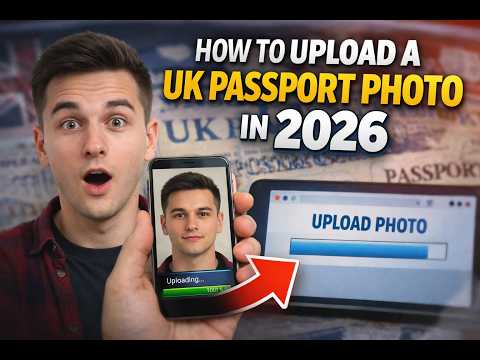
Many users worry that "uploading a file" is the manual, difficult route. In reality, it is often the most reliable method because it removes the middleman. By providing a .jpg file directly, you ensure the data is delivered immediately without relying on external database handshakes.
Removing the Middleman
A direct upload allows you to verify technical metadata before submission. You can check the UK digital passport photo pixels and file size yourself, ensuring the file meets the strict 50KB to 10MB limit. If the portal's automatic checker rejects the file, you can adjust the lighting or crop and re-upload instantly.
A Decision Framework for Your Application
| Your Situation | Recommended Method | Why? |
|---|---|---|
| Adult Renewal (UK) | Photo Code | Convenient if you are near a compliant booth. |
| First Adult Passport | Digital Upload | Higher scrutiny; you want to verify every detail. |
| Child/Baby Application | Digital Upload | Impossible to get a child to remain still in a booth. |
| Applying from Abroad | Digital Upload | UK-compliant photo booths do not exist overseas. |
| Troubleshooting Issues | Digital Upload | Best if your passport photo code is not recognised. |
Renewals vs. First-Time Applications
For renewals, the system compares your photo against previous biometric data. However, for a first-time application, your photo establishes your baseline in the HMPO biometric database. Precision is non-negotiable here to avoid rejection.
Biometric Technicalities: Pixels, Ratios, and AI
HM Passport Office uses advanced AI to identify facial landmarks. If your photo's geometry is wrong, the AI cannot verify your identity, leading to an automatic "Red" rejection.
The 4:5 Aspect Ratio Requirement
Most smartphones capture images in 3:4 or 9:16. However, UK passport photos must be 4:5. If you upload a standard smartphone photo, the GOV.UK tool will attempt to crop it. If there isn't enough "headroom" in your original shot, the crop might cut off your hair or chin.
- Dimensions: Minimum 600 pixels wide by 750 pixels high.
- Resolution: Aim for 1200 x 1500 pixels for optimal clarity.
File Constraints and Formats
Photos must be in JPEG or JPG format. iPhone users must ensure their camera is not saving files as 'HEIC', as these are incompatible with the GOV.UK portal. This is a common reason for a mistyped passport photo code or upload failure.
Applying from Abroad: The Overseas Problem
British nationals applying from the US, EU, or Australia often face significant hurdles. Local photo shops typically provide sizes based on their own national standards, which are incompatible with UK rules.
The 2x2 Inch Trap
In the USA, the standard is 2x2 inches (1:1 ratio). This will be rejected by the UK portal. Furthermore, international shops cannot provide a valid UK passport photo code abroad.
Getting a UK-Compliant Photo Anywhere
If you are overseas, your best option is to follow our digital photo guide to take a photo at home. By using our service, you ensure the image meets HMPO international standards and the global ICAO Document 9303 standards for machine-readable travel documents.
The Physics of Rejection: Lighting and Backgrounds
Technical specs are only half the battle. The physical environment is what allows the AI to "read" your face clearly.
Managing Shadows and the 'Halo Effect'
A common failure occurs when users stand too close to a wall, creating a dark shadow behind the head. The AI often misinterprets this shadow as part of the head, causing a biometric error.
The Solution: Stand at least 50cm (2 feet) away from a plain wall and use natural light from a window rather than a camera flash.
Cream vs. Grey: The Background Reality
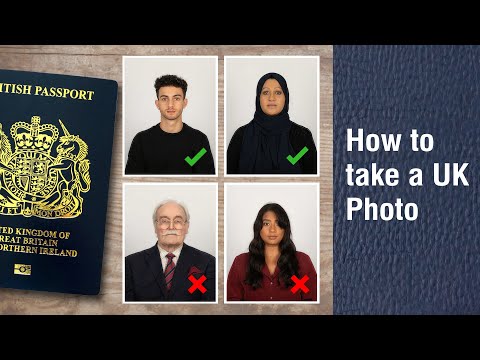
According to official GOV.UK photo rules, the background must be plain cream or light grey. Avoid white doors or glossy surfaces, as they reflect light and can "wash out" the edges of your face, making it difficult for the software to distinguish your features.
Frequently Asked Questions
What should I do if my passport photo code is not working?
First, check for common transcription errors (e.g., mistaking a '0' for an 'O'). If the code is definitely correct but not recognised, it may have expired or the provider's server may be down. In this case, you should switch to the "Digital Upload" method using the original image file.
How do I use a passport photo code for a paper application?
You cannot. Photo codes are designed exclusively for online applications via GOV.UK. If you are submitting a paper form, you must provide two identical printed photos that meet the HMPO printed photo guidance.
Is a photo code better than a digital upload?
Neither is "better" in terms of approval probability. A code is more convenient if you are using a booth, while a digital upload offers more control and is necessary for applications made from outside the UK.
Does a 'Yellow' result mean my photo was rejected?
No. A yellow status means the AI found a potential issue that requires human review. Most yellow results—such as those regarding background shade—are ultimately accepted by the examiner as long as the face is clear.
Troubleshooting: Interpreting the Results
After you enter your UK passport photo code or upload your file, the system provides a status:
- Green: The AI has verified all biometric markers. You are safe to proceed.
- Yellow: A human will review the photo. Ensure there are no shadows on your face.
- Red: Automatic rejection. This usually happens due to closed eyes, a non-neutral expression, or incorrect aspect ratios.
In conclusion, whether you choose a code or an upload, success depends on technical precision. By following these guidelines and using a trusted service to get a passport photo code online, you can ensure your 2026 passport application is processed without delay.
Technical Reference & Sources:
- GOV.UK: Official Digital Passport Photo Rules
- ICAO: Machine Readable Travel Documents (Doc 9303)
- HM Passport Office: Guidance for Photos and Examiners
- HM Passport Office: Overseas Passport Applications
- GOV.UK Statistics: HMPO Performance Data