UK Passport Photo Code vs Digital Photo Upload: A Practical Guide
Confused about choosing between a UK passport photo code and a digital upload? Learn the pros and cons of each method, how to troubleshoot a 'code not recognised' error, and why expats living abroad should choose direct upload for their online UK passport renewal.
If you’re currently navigating the GOV.UK passport application, you’ve reached the pivotal choice: should you enter a UK passport photo code or perform a digital photo upload? This decision often feels more complicated than it needs to be, especially when a simple mistake can lead to application delays.
Neither method is inherently 'better' for approval. Both undergo the same rigorous checks by HM Passport Office (HMPO). The right choice depends entirely on your location, your access to technology, and whether you prefer the convenience of a photo booth or the control of a smartphone photo.
The Quick Answer: Code or Upload?
If you have access to a UK-based photo booth or a professional photographer, a UK passport photo code is the fastest retrieval method. If you are applying from abroad, have a high-quality photo on your phone, or want to save money, the digital photo upload is superior. Both methods pass through the same HMPO automated checker and human inspection.
Retrieval vs Approval: What a Photo Code Actually Does
There is a widespread myth that having a photo code guarantees your photo will be accepted. In reality, a photo code is nothing more than a digital retrieval key.
The 'Luggage Claim' Mechanic
When you use a booth or shop, they upload your image to their private server and give you a 9-digit or 14-digit code. When you enter this into the GOV.UK site, the system 'claims' that image from the provider's server.
The AI Checker vs Human Examiner
Once the image is retrieved (via code) or uploaded (via file), it is scanned by HMPO's AI. This software looks for technical markers like head size and background contrast. However, the final word always rests with a human examiner. They ensure the photo is a true likeness and meets official internal guidance that AI might miss, such as subtle reflections on glasses.
The Decision Matrix: Which Method Suits You?
| Feature | Photo Code | Digital Photo Upload |
|---|---|---|
| Best For | UK residents near booths | Expats and DIY photographers |
| Cost | Typically £10 - £15 | Free (if taken at home) |
| Convenience | Instant at the booth | Requires a helper/tripod at home |
| Location | UK only | Global availability |
| Control | Limited to booth software | Multiple retakes possible |
When the Photo Code Wins
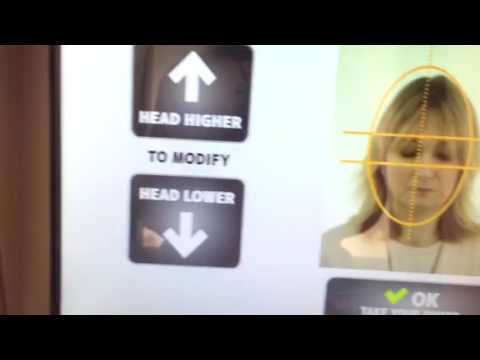
If you're in a hurry and walking through a UK supermarket, a Me-Group (formerly Photo-Me) booth provides a physical receipt and a code instantly. It’s ideal for those who aren't tech-savvy or don't have someone to take their photo.
When Digital Upload is Superior
Choosing to get a passport photo code online or uploading a file directly gives you more flexibility. You should upload your own photo if you want to ensure the lighting is perfect or if you are applying for a child who may find a photo booth stressful.
The 'Overseas Gap': Why British Expats Can’t Find Codes
One of the most common issues for British nationals in the USA, Australia, or Europe is searching for a "UK passport photo code near me" and finding nothing. This is because overseas retailers do not have access to the UK's specific retrieval system.
If you visit a local pharmacy abroad, they will provide a physical print or a JPEG file. They cannot generate the code required by the UK application. In this scenario, you should simply select the "upload a photo" option. Alternatively, you can use Passport Photo Code to convert your home-taken photo into a compliant digital format and a retrieval code that works globally.
Troubleshooting: 'Passport Photo Code Not Recognised'
If you are facing a passport photo code not working error, it is rarely a reason to panic. Most issues are caused by simple technical glitches.
- Character Confusion: Codes often mix numbers and letters. The most frequent errors involve mistaking '0' (zero) for 'O' (letter), or '1' (one) for 'I' (capital i) or 'l' (lowercase L).
- The 1-Hour Rule: Photo booths often upload in batches. If you try to use your code immediately after leaving the booth, the server may not have synced. Wait 60 minutes and try again.
- Code Expiry: Most codes are valid for only 30 days due to privacy regulations. If your code has expired, the image has likely been purged from the provider's server.
- Mistyped Code: Ensure you haven't added extra spaces or hyphens. Double-check every digit against your receipt.
Interpreting the GOV.UK Photo Checker Results
After you enter your code or upload your file, the system provides an automated rating. Understanding these results is vital for a successful application.
The 'Poor' Result: Why You Must Restart
A 'Poor' rating is a hard rejection. This usually means the photo has failed on fundamental technical grounds:
- File Size: The digital photo must be at least 600 pixels wide and 750 pixels tall.
- Background: Anything other than a plain, light grey or cream background will trigger a fail.
- Shadows: Strong shadows on your face or the wall behind you.
The 'Fair' Result: When to Risk the Override
A 'Fair' result is a warning. If you can see your face clearly and the background is plain, you can often click 'proceed' anyway. Many users find that a photo flagged as 'Fair' by the AI is easily accepted by the human examiner who understands common sense exceptions.
Privacy and Security: Who Stores Your Face?
When you use a photo booth or an online service, your biometric data is stored temporarily. According to the ICO's definition of biometric data, these images are sensitive information. Most booth providers delete photos after 30 days. At Passport Photo Code, we prioritize your privacy, normally retaining photos for no longer than 48 hours—just enough time for you to complete your application.
Frequently Asked Questions
Can I get a free passport photo code UK?
While most photo booths charge a fee, you can use your smartphone to take a photo for free. Services like Passport Photo Code then allow you to prepare that photo for the official specification without any cost, providing a downloadable file and a code for your application.
Is it better to use a photo code or upload a digital photo?
There is no difference in the approval rate. Choose a code for convenience if you are in the UK near a booth, or a digital upload if you are abroad or taking the photo yourself at home.
Why is my passport photo code not recognised?
This is usually due to a typo (check 0 vs O), an expired code (usually 30 days), or because the booth hasn't uploaded the batch to the server yet.
Can I use a digital photo code for a paper application?
No. Photo codes are exclusively for online applications. For paper forms, you must provide two physical printed photos that meet the Post Office Digital Check & Send standards.
Final Submission Checklist
- Check the Light: Ensure there is even lighting on your face to avoid 'Fair' or 'Poor' ratings due to shadows.
- Neutral Expression: Do not smile or frown; keep your mouth closed and eyes open.
- No Glare: If wearing glasses, check for reflections. It is often easier to remove them.
- Wait for Sync: If you just used a booth, wait an hour before entering the code.
- Expat Rule: If you are outside the UK, don't look for a local code—upload your digital file directly.
By choosing the method that fits your circumstances, you can move through the photo stage of your UK passport application with confidence and speed.