UK Passport Photo Code Troubleshooting: Fixing GOV.UK Errors
Struggling with a UK passport photo code not working? This technical guide explains GOV.UK error messages, why international codes don't exist, and how to submit your digital photo successfully.
If you are staring at a red error message on the GOV.UK website after entering your UK passport photo code, you aren’t alone. It is one of the most common bottlenecks in the digital application process. Whether your code is "not recognised" or your photo keeps getting a "poor" rating from the automated checker, understanding the technical requirements of HM Passport Office (HMPO) is the first step to a successful application.
Quick Troubleshooting Checklist: Why Your Code Might Fail
- Server Sync Issues: High-street codes often take 30-60 minutes to "go live" on the provider's database.
- Alphanumeric Typos: Confusion between the number '0' and letter 'O', or '1' and 'I' is extremely common.
- Code Expiry: Most digital codes are purged by the provider (like Photo-Me or Max Spielmann) after 30 days.
- Wrong Input Box: Ensure you aren't accidentally entering your PEX application reference instead of the 10-character photo code.
Why is my UK Passport Photo Code Not Working?
A UK passport photo code is a 10-character alphanumeric string generated by commercial photo booths or retail shops. If the GOV.UK system reports that your code is not recognised, it typically means the photo has not yet been uploaded to the third-party server or the code contains a simple typo.
The Direct Answer: Most Common Failure Points
Most "code not recognised" errors are temporary. If you have just left a photo booth, wait at least half an hour before trying to get a passport photo code online or via the official portal. The vendor's system must synchronize with the government's retrieval service. If the error persists after 60 minutes, it is often more efficient to skip the code and use the direct digital photo upload method using a prepared JPG file.
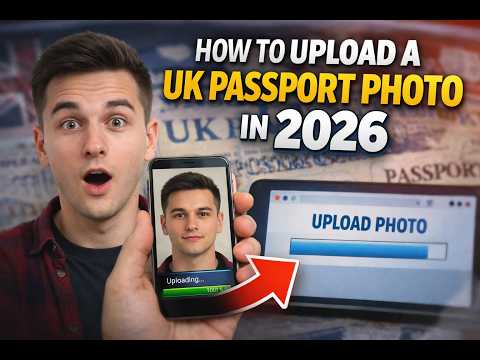
Photo Code vs. Application Reference: Don't Confuse the Two
It is a frequent mistake to enter a PEX application reference number into the photo code field. The application reference (e.g., PEX 123 456 789) tracks your overall progress, while the photo code is solely for image retrieval. Always double-check your receipt to ensure you are using the correct 10-digit string.
Photo Code vs. Digital Upload: Which One Should You Choose?
You do not strictly need a photo code to complete an online UK passport application. HMPO accepts two distinct submission methods: entering a retrieval code or directly uploading a digital image file from your device.
The Myth of the 'Guaranteed' Shop Code
High-street retailers often market their codes as "guaranteed to pass." Technically, they can only guarantee that the file meets official digital photo requirements regarding pixels and file size. They cannot guarantee that your facial expression or head position will be accepted by an HMPO examiner. You are paying for the retrieval service, not a guaranteed passport approval.
The Case for Direct Digital Uploads
Directly uploading a digital file often provides a smoother user experience. If a code fails, you are dependent on the shop's customer support. If a digital file is flagged, you can simply take another photo and try again instantly. Using a tool like Passport Photo Code to prepare your image is a reliable way to ensure your self-taken photo meets the technical specs for online UK passport application photo submissions.
The 'Good' vs. 'Fair' Rating: Decoding the GOV.UK Checker
When you submit your photo, the GOV.UK automated tool uses AI to assess your biometric compatibility.
What the Automated Tool Actually Sees
Based on technical standards from the ICAO, the system maps facial landmarks to ensure the photo is suitable for biometric e-gates. The checker evaluates:
- Landmark Accuracy: The precise distance between your pupils, nose, and mouth.
- Shadow Density: Whether shadows on the face or background obscure features.
- Pixel Density: Ensuring the image is at least 600 pixels wide and 750 pixels tall.
Why a 'Fair' Result Isn't the End of the World
If the tool gives you a "Fair" rating, it usually signals a minor lighting or background issue. However, HMPO internal guidance suggests that human examiners frequently approve photos that the AI flags as "Fair," provided the face is clear and the background is plain. If you are confident the photo meets the rules, you can select the option to "use this photo anyway."
Obtaining a UK Passport Photo Code While Abroad
If you are a British expat or national overseas, you will discover that local photo studios in the US, Europe, or Australia cannot provide a UK passport photo code abroad. The code system is unique to the UK's high-street infrastructure.
DIY Solutions for Expats
British nationals applying from outside the UK should avoid searching for a photo code. Instead, follow these steps:
- Take a high-quality photo at home against a plain, light-coloured wall.
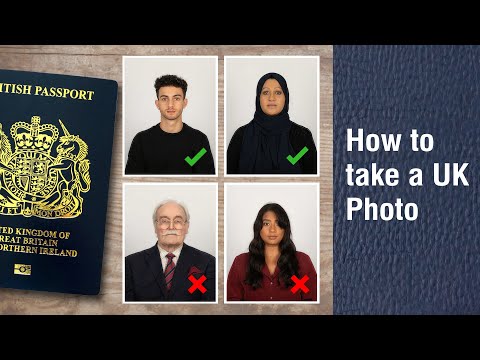
- Ensure your hair is away from your eyes and your expression is neutral.
- Upload the digital JPG file directly to the GOV.UK overseas application portal.
Technical Breakdown: Why HMPO Humans Reject 'Good' Photos
An automated "Good" rating is only the first hurdle. Once you pay the £88.50 application fee, your photo is reviewed by a human. Rejections often occur for reasons the AI overlooks:
- Biometric Noise: Subtle glare on glasses that obscures the iris.
- Head Tilt: A slight 2-3 degree tilt that prevents accurate biometric mapping.
- Contrast Issues: If the background is too similar to your skin tone or clothing.
Common Error Messages and Their Real Meanings
| Error Message | Real Meaning | Solution |
|---|---|---|
| "Code not recognised" | Data not yet synced or typo. | Wait 30 mins; check '0' vs 'O'. |
| "Photo too small" | Image resolution is too low. | Re-take or use a professional formatting tool. |
| "Service unavailable" | GOV.UK server issues. | Try again later; avoid peak evening hours. |
| "Photo timed out" | Connection to provider failed. | Re-enter the code or use direct upload. |
Frequently Asked Questions
Does a UK passport photo code expire?
Yes. Most high-street providers delete the digital file after 30 days to comply with data protection regulations. You should use the code as soon as you receive it.
Can I use a photo code for a paper passport application?
No. Photo codes are exclusively for digital applications. If you are using the Post Office Check & Send service, they will handle the digital transfer for you, but you cannot use a code for a traditional paper form.
Why is my passport photo code not recognised after 24 hours?
If it has been over 24 hours, the upload likely failed on the provider's end. You should contact the shop where you got the code or opt for a direct digital file upload instead.
Summary and Next Steps
While a UK passport photo code is a helpful tool, it is not the only way to submit your image. If your code is not working, remember that direct digital upload is a faster and more flexible alternative. Focus on getting the lighting and pose correct, and use a dedicated tool to handle the technical dimensions. Once your photo is ready, you can proceed with confidence, knowing you have minimized the risk of delays and rejection. If you need to prepare your photo for a direct upload right now, our homepage can help you get the job done in seconds.