UK Passport Photo Code Troubleshooting: Fix Error & Checker Results
Having trouble with your UK passport photo code? Learn how to fix 'invalid code' errors, decode HMPO checker results ('Fair', 'Poor', 'Good'), and decide whether to upload a digital photo instead. Get expert advice on passport renewal and British passport applications from abroad.
If you’re staring at a screen that says your UK passport photo code is 'not recognised' or you’ve been told your photo is only 'fair,' you aren't alone. It’s a common hurdle. You might have just spent £12 at a high-street photo booth, only for the official GOV.UK website to reject the very thing you paid for.
I’ve spent years analyzing the technical requirements of HM Passport Office (HMPO). The system isn't trying to be difficult—it’s just incredibly literal. It’s an algorithm following a strict set of geometric and tonal rules. Once you understand the logic behind the code and the checker, you can stop guessing and finish your application.
The 5-Minute Checklist for an 'Invalid Code' Error
Before you head back to the shop or bin your receipt, try these quick fixes. Most 'invalid' errors aren't caused by a bad photo; they happen because of simple communication breakdowns or typos.
1. The Zero vs. Oscar Problem
This is the most frequent culprit. British passport photo codes are alphanumeric strings, and characters like '0' (zero) and 'O' (the letter) look almost identical on a smudged thermal paper receipt. The same applies to 'I' (India), '1' (one), and 'L' (Lima), or '5' and 'S'.
If your UK passport photo code isn't working, try swapping these characters. If you entered a zero, try an 'O'. It sounds basic, but it solves a huge percentage of 'not recognised' errors instantly.
2. The 'Booth-to-System' Lag
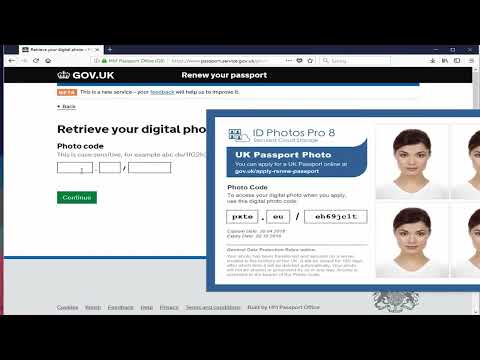
When you use a booth (like Photo-Me or Max Spielmann), the machine uploads your image to a private server and generates a code. However, it can take anywhere from 15 minutes to a few hours for that code to 'activate' and become visible to the GOV.UK application server. If you’re trying to enter the code while still standing in the supermarket, wait an hour and try again.
3. Expiry and Single Use
Most codes expire after 30 days. Additionally, a code is designed for one-time use. If you started an application, saved it, and are now trying to use the code in a new application, the system might flag it as already used. You should use the 'retrieve application' feature on GOV.UK rather than starting from scratch.
What Exactly is a UK Passport Photo Code?
It’s helpful to understand that a Photo Code is not the digital photo itself. Think of it as a digital key. When you enter that code, you’re giving HMPO permission to fetch your image from a third-party server (the booth provider).
If you have a digital file (a .jpg or .jpeg) on your phone or computer, you don’t actually need a code. You can upload the file directly. Our Passport Photo Code service provides both—the code for convenience and the digital file for your records.
Decoding the HMPO Automated Checker Results
After you enter a code or upload a file, the GOV.UK system runs an automated check. This isn't a human examiner; it’s an AI measuring pixels according to the official UK digital passport photo requirements. You’ll get one of three results:
The 'Good' Result: Is it a Guarantee?
A green 'Good' result means the AI verified your head is the right size, your eyes are positioned correctly, and there’s enough contrast against the background.
However, 'Good' isn't a 100% guarantee of acceptance. The AI can miss things like tinted glasses, hair obscuring your eyes, or a subtle 'uniform' (which isn't allowed). A human examiner still does a final check, but if the AI says 'Good,' you’re 95% of the way there.
The 'Fair' Result: The Great Decision Matrix
This is the 'amber' zone that causes the most anxiety. A 'Fair' result means the AI found something it didn't like, but it’s not bad enough to automatically block you. The system will ask: "Do you want to use this photo anyway?"
| Issue Type | 'Fair' Recommendation | When to Retake |
|---|---|---|
| Shadows | Proceed if minor (behind ears) | Retake if across the face |
| Background | Proceed if light grey/cream | Retake if very dark or cluttered |
| Expression | Proceed if mouth closed | Retake if teeth are showing |
| Contrast | Proceed if features are clear | Retake if features are 'washed out' |
If your teeth are showing, don't risk it; it’s an automatic fail under HMPO's official photo standards.
The 'Poor' Result: Why the System Blocks You
A 'Poor' result is a red light. The system often prevents you from moving forward because the photo is fundamentally flawed. This is usually due to:
- Eyes closed or obscured: Often caused by thick frames or lens glare.
- Framing: Your head is too large (too close) or too small (too far away).
- Blur: The file is too compressed or out of focus.
If a high-street booth code gives you a 'Poor' result, don't keep trying that code. It won't change. You need a new photo.
Photo Code vs. Digital Photo Upload: Which Should You Use?
There is no difference in how HMPO treats these methods. Both end up as the same digital file on an examiner’s screen. For an online UK passport application photo, you have two main choices:
- The Photo Code: Best for simplicity. You don't have to worry about file sizes or formats; you just type a code.
- The Digital Upload: Better for control. When you upload your own photo (or one prepared by our service), you can see the file quality yourself and keep a copy for other IDs.
If your code is failing, I recommend switching to the upload method. You can take a photo on your phone, use our photo preparation tool, and upload the result. This bypasses the booth server entirely.
Technical Troubleshooting: Beyond the Basics
Sometimes the error is about the file, not your face. If your upload is rejected before the checker even runs, check these three specs:
- File Format: It must be a .jpg or .jpeg. Modern iPhones often save photos as .HEIC files, which GOV.UK won't always accept.
- File Size: The file must be between 50KB and 10MB. If you sent the photo via WhatsApp, it might have been shrunk below the 50KB limit.
- Pixel Dimensions: HMPO requires the photo to be at least 600 pixels wide and 750 pixels tall. Avoid cropping too tightly on your phone.
Applying from Abroad: Why Foreign Photo Codes Often Fail
This is a massive pain point for British expats. If you go to a pharmacy in the USA or a post office in Australia, they might give you a 'UK Passport Photo Code.'
However, the UK Photo Code system is a proprietary network. Codes generated by foreign retailers will not work on the GOV.UK website. For a British passport photo code outside the UK, your best bet is to take a digital photo on your phone and use a UK-specific service to generate a compatible file. Many people use Passport Photo Code from overseas specifically to bridge this gap.
The Human Factor: What Happens During Manual Review?
Remember, the automated checker is just the gatekeeper. Once you submit, a human examiner looks at your photo on a calibrated monitor. According to HMPO’s guidance for examiners, they are instructed to be pragmatic. They are only strict on 'biometric' blockers—things that would make an automated facial recognition gate fail later on, such as those defined in ICAO Document 9303 standards.
How to Use Passport Photo Code to Bypass Booth Errors
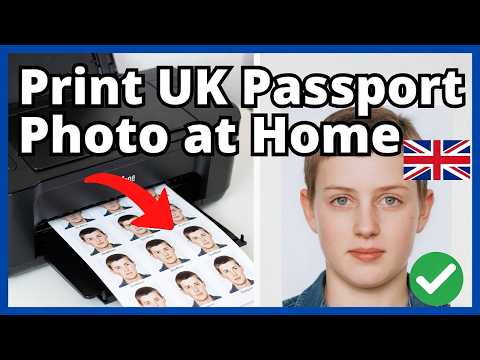
If you’re fed up with booth codes or 'Poor' results, here is the most efficient workflow to get a passport photo code online:
- Take a photo at home: Stand against a plain, light wall. Have someone else take the photo (no selfies). Use natural light from a window to avoid harsh shadows.
- Upload to our service: Head to Passport Photo Code and upload your raw photo.
- We handle the technicals: Our system checks the photo against the UK specifications, adjusts framing, and ensures the background is compliant.
- Get your Code & File: We’ll provide you with a UK-compliant Photo Code and a digital file.
- Submit: Enter the code on GOV.UK.
Frequently Asked Questions
Can I use the same photo code for two children?
No. Each application needs its own unique photo and code. Reusing a code will cause a system error or delay.
My photo looks stretched on the GOV.UK preview. Is that a problem?
Usually, no. The preview on the government site can look distorted depending on your mobile browser. As long as the 'Checker' result is Good or Fair, the actual file they receive will be in the correct proportions.
How long is my photo kept for privacy?
Privacy is paramount. While some booths keep photos for a month, our service retains photos for no longer than 48 hours before they are permanently deleted.
Does a 'Good' result mean my passport is approved?
No. It only means your photo has passed the first stage. Your identity and documents still need verification. You can also use the Post Office Digital Check & Send service if you prefer an in-person double-check.
Summary
Don't let a technical error derail your travel plans. If a UK passport photo code doesn't work, it’s usually just a typo or a server lag. If the checker gives you a 'Fair' result, use the criteria above to decide whether to push through. If all else fails, skip the booth and go digital. It’s often faster and gives you significantly more control over the final result.