UK Passport Photo Code Not Working? How to Fix It or Bypass the Booth
Struggling with a 'code not recognised' error on the GOV.UK portal? This expert guide troubleshoots activation delays, character confusion (0 vs O), and the technical reasons why UK photo codes rarely work for British expats abroad. Learn when to wait, when to ask for a refund, and how to use a direct digital upload to finish your application without the stress.
If you are currently staring at a red error message on the GOV.UK portal, you aren’t alone. A UK passport photo code not working is a common point of friction for many applicants. You’ve likely paid for a photo booth session, clutched your receipt, and typed in the 12-to-14-digit string with absolute care, only to be told the code is "not recognised." While the UK digital passport application is world-class, the "Photo Code" system relies on a delicate handshake between third-party booths and the HM Passport Office (HMPO).
The Immediate Fix: Troubleshooting Your Passport Photo Code
Before you head back to the shop for a refund, let’s rule out the simple technical fixes. A passport photo code is essentially a retrieval key. If the system can't find it, it's either being entered incorrectly or the booth provider hasn't synced with the central database yet.
The 60-Second Troubleshooting Checklist
- Swap 'O' for '0': Photo codes almost never use the letter 'O'. If you see a circle, it’s almost certainly a zero.
- Wait 24 Hours: If you took the photo in the last few hours, the booth provider's server may not have synced with the HMPO database yet.
- Check the Source: Was this a UK-approved booth? Local "digital codes" from international pharmacies are not compatible with the UK portal.
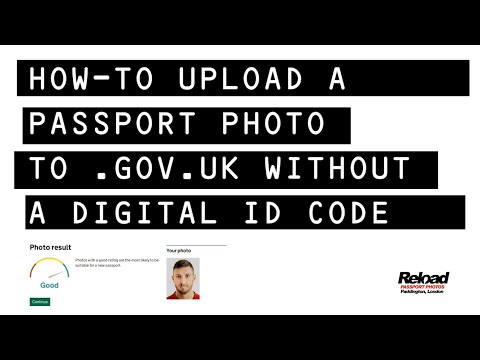
- Bypass the Code: You don't actually need a code to apply. You can upload a digital photo file instead and skip the booth receipt entirely.
Decoding the 'Not Recognised' Error
When the GOV.UK site says a code is not recognised, it means the database is returning a blank result for that specific character string. This is often caused by physical limitations of the technology used in retail environments.
Character Confusion: Thermal Paper Pitfalls
Most booth receipts are printed on thermal paper. The printers in these machines often suffer from "ink bleed" or low contrast, making certain characters nearly identical. To avoid common errors:
- The Zero Rule: In the character sets used by IDNow and Photo-Me, the letter 'O' is typically excluded. If your code looks like it contains an 'O', try a '0'.
- The 'I', '1', and 'L' Confusion: A capital 'I' (India) can look exactly like a '1' (one) or a lowercase 'l' (lima).
- The 'S' and '5' Swap: If the printer was running hot, the curves of an 'S' can easily blur into a '5'.
Format and Case Sensitivity on GOV.UK
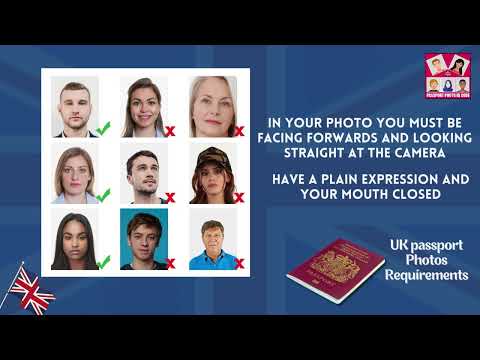
While the portal tries to be helpful, it can be finicky. Ensure you aren't including any spaces before or after the code. Most codes are alphanumeric and uppercase; while the system should auto-convert lowercase, it’s best to use your Caps Lock key to be certain. You can verify the official GOV.UK photo requirements to ensure your image meets the necessary biometric standards once retrieved.
The Synchronisation Gap: Why New Codes Often Fail
Technology is rarely instantaneous. When you finish your session in a booth at a supermarket or train station, that data is stored locally, batched to the provider's server, and finally made available to HMPO. Technical maintenance windows on either the provider’s end or the government's end can cause a lag.
According to the Post Office Digital Check & Send service, it can take up to 24 hours for a code to become "live" in the system. If you just stepped out of the booth, wait until the next day before assuming the code is broken.
The Expat Trap: Using a UK Passport Photo Code Abroad
This is the single biggest hurdle for British nationals living overseas. You might find a professional photographer in the USA, Australia, or Europe who promises a "digital code," but it won't work on the UK application.
Regional Ecosystem Incompatibility
The UK Passport Photo Code system is a proprietary commercial integration between HMPO and specific UK-based vendors. This infrastructure does not exist in most foreign countries. If a pharmacy or studio abroad offers you a code, they are likely giving you a retrieval code for their own website. That code will not be recognised by the GOV.UK portal.
Applying from Overseas: The Digital Upload Route
If you are applying for a British passport from abroad, stop looking for a code. According to official HMPO guidance for international applications, the standard procedure is to upload a digital photo file.
Our digital photo service was designed specifically for this. You can take a photo on your phone against any light-coloured wall, and we will handle the technical conversion to ensure it meets the UK's exact biometric specs—no booth required.
Passport Photo Code vs Digital Photo Upload: Which is Better?
There is a lingering myth that a Photo Code is "more official" than a direct upload. Both methods deliver the same thing: a digital image to the HMPO examiner. If your UK passport photo code is not working, switching to a direct file upload is a perfectly valid and often faster alternative.
How the HMPO AI Review System Works
When you enter a code, the system retrieves a file that has been pre-validated by the booth's software. When you upload a file directly, the HMPO system runs its own AI check in real-time. According to the Government Digital Service (GDS), the AI checks for biometric markers like interpupillary distance and head height. The AI doesn't care how the photo got there—only that the image meets the criteria.
The Benefits of Uploading Your Own Photo
- Flexibility: You can take dozens of photos at home until you’re happy with the result.
- Cost Efficiency: Direct uploads bypass the premium cost of booth sessions, which can average £10-£15.
- Quality Control: You can see the photo clearly on your high-resolution screen before you submit it, rather than trusting a small booth monitor.
Biometric Privacy and the 30-Day Expiry
Why do codes stop working after a few weeks? It’s a matter of data law. Under UK GDPR and the Data Protection Act, biometric data cannot be stored indefinitely without a clear reason. Guidance from the Information Commissioner’s Office (ICO) outlines strict rules for handling sensitive identifiers.
Most UK code providers delete your photo from their servers after 30 days. If you took your photo and then got sidetracked, the code will be "not recognised" because the file has been purged. At Passport Photo Code, we prioritise your privacy by retaining photos for only 48 hours.
The 'Retrieved But Rejected' Scenario
Sometimes the code works, the photo appears, but then you see a yellow warning saying the photo is "unlikely to be accepted." It’s important to remember that the automated checker is conservative. A human examiner at HMPO has the final say. If the warning is yellow, you can often proceed, but if it is red (eyes closed, mouth open), you must retake the photo. A booth code does not guarantee acceptance; it only guarantees the photo met the booth’s basic technical standards.
Decision Matrix: Should You Keep Trying or Start Over?
| Scenario | Likely Cause | Recommended Action |
|---|---|---|
| Code 'Not Recognised' (UK bought) | Typo or Sync Lag | Try '0' vs 'O'. Wait 24 hours. |
| Applying from Outside the UK | Regional Incompatibility | Skip the code; get a passport photo code online or upload a JPEG. |
| Code is >30 Days Old | GDPR Data Deletion | The code has expired; you will need a new photo. |
| Code works but photo is flagged | Poor lighting/Shadows | Retake the photo at home to ensure 100% compliance. |
The Bottom Line
If your UK passport photo code is not working, don't let it delay your application. You can bypass the entire booth system by generating your own code or digital file with a simple smartphone photo. If you've paid for a booth code that simply won't work after troubleshooting, you have consumer rights regarding faulty digital services; organisations like Which? provide guidance on how to secure a refund.
Frequently Asked Questions
Do I need a photo code for a UK passport renewal? No. It is an optional convenience. You can simply choose the "upload a digital photo" option instead during the online application process.
Where is the passport photo code entered? You enter it on the GOV.UK website after you've started your application and selected the "I have a digital code" option.
Can I use a photo code for a paper application? No. Photo codes are exclusively for online applications. Paper forms require two physical, printed photos with your name written on the back of one.
What if I lost my photo code? You will need to take a new photo. There is no central database to retrieve a lost code using your name, as the photo booth companies are independent of the government.