Choosing Between a UK Passport Photo Code and Digital Upload
Struggling to decide between a UK passport photo code and a direct digital upload? This guide breaks down the technical differences, solves 'code not recognised' errors, and explains why the HMPO automated checker isn't the final word on your photo.
You've finally reached the 'Add your photo' page of the online UK passport application. Now you're staring at two buttons: 'Enter a photo code' and 'Upload a digital photo.' It looks simple, but this is exactly where many applications stall.
If you have a UK passport photo code from a booth or an online service, you might expect it to work instantly, only to be met with an error message. Or perhaps you've taken a great photo on your phone, but the GOV.UK checker keeps insisting your head is too small or the background is 'too grey.'
I've spent years analysing how HM Passport Office (HMPO) handles digital images. The difference between a code and an upload isn't just about convenience; it's about who has vetted that photo before the government’s AI even sees it. Let's clear up the confusion so you can get your application finished.
The Choice: Photo Code vs. Digital Upload
The Quick Answer: Which One Should You Use?
If you want the easiest experience and the highest chance of first-time acceptance, use a UK passport photo code.
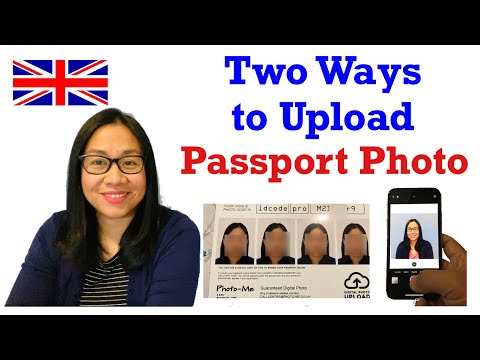
Think of a photo code as a pre-validated ticket. When you use a service like Passport Photo Code, your image is automatically cropped to the 3:4 aspect ratio, adjusted for pixel density, and checked for common errors before it ever touches the official application portal.
Direct uploads are fine if you're technically confident and have a high-quality camera, but you're effectively acting as the technician. You have to ensure the lighting, shadows, and positioning are spot-on, which is where most 'at-home' photos fail.
Why the HMPO System Rejects 'Perfect' Photos
To understand why one method works and the other doesn't, we need to look at what's happening behind the screen. HMPO doesn't just 'view' your photo; their system uses a biometric algorithm to measure the geometry of your face—the distance between your eyes, the tip of your nose, and the edges of your mouth.
The Difference Between a Code and a File
A UK passport photo code is a digital 'claim ticket.' When you type it into the GOV.UK site, the portal reaches out to a secure server to retrieve the image. This process ensures the file format is exactly what the system expects.
| Feature | Photo Code | Direct Digital Upload |
|---|---|---|
| Sizing | Automatically cropped to 3:4 | Manual cropping required |
| File Type | Guaranteed compatibility | Risk of 'Corrupt' or 'Wrong Format' |
| Pre-Check | Validated by provider | Validated only by GOV.UK AI |
| Convenience | Type 6-9 characters | Find, resize, and upload file |
The Aspect Ratio Trap: 4:3 vs. 3:4
When you upload a file directly from your smartphone, you're usually sending a 'raw' 4:3 image. UK passports require a 3:4 ratio. If you don't crop it perfectly, the system might stretch your features to make it fit, which triggers an instant rejection. According to the Information Commissioner’s Office (ICO) guidance on biometric data, these algorithms are highly sensitive to facial geometry distortions.
Deciding Which Method Suits You Best
Using a High Street Photo Booth
If you're already out, a booth that provides a code is a traditional choice. You'll usually pay between £10 and £15.
- The upside: It’s a controlled environment with fixed lighting.
- The downside: You can’t see the final result clearly until it’s too late to change it. Also, if the booth has a poor internet connection, your code might not work for several hours after you've paid.
Taking Your Own Photo at Home
This is the most popular route now. You have a friend take your photo against a plain, light-coloured wall. You then have two choices: upload the raw file or get a passport photo code online using a tool that prepares the image for you.
Expert Tip: Instead of gambling with a raw upload, use a photo preparation tool. It checks for those pesky shadows and gives you a photo code that you simply type in. It's the safest middle ground between a DIY photo and a professional result.
Troubleshooting 'Code Not Recognised' Errors
It’s incredibly annoying to have a code in your hand and see 'Code not recognised' or 'Photo not found.' Before you give up, check these common fixes.
Common Typing Mistakes and Character Confusion
Most of the time, the issue is character confusion. Codes often use a mix of letters and numbers that look identical.
- The 'O' and '0' Problem: Is it the letter 'O' or the number zero? Try both.
- The 'I' and '1' Problem: Is it a capital 'I', a lowercase 'l', or the number '1'?
- The Sync Delay: If you just got your code from a booth five minutes ago, it might not have reached the central server yet. Wait an hour and try again.
The Truth About Code Expiry
There’s a common myth that all codes last 30 days. This is true for many retail booths—they purge your data after a month to comply with privacy rules. However, once you've successfully entered the code into your application and the photo has been accepted, it’s saved to your application. You don’t need to worry about the code expiring after that point.
The International Problem: Applying from Abroad
If you're a British national in the USA, Australia, or the EU, getting a UK-compliant photo is notoriously difficult. In these cases, you often need to use a passport photo code to bridge the gap between local standards and UK requirements.
Why Foreign Photo Standards Usually Fail the UK System
Every country has different rules. In the US, a standard passport photo is 2x2 inches (square). The UK requires a rectangular 35x45mm format. If you go to a local pharmacy in New York or Sydney and get a 'standard' photo, it will almost certainly be rejected by the HMPO portal because the dimensions are wrong. You need a service that understands the official GOV.UK digital photo requirements specifically.
Beyond the AI: What Happens After Submission?
Here’s a bit of 'inside' information: The automated checker you see when you upload is just the first gatekeeper. It’s an AI looking for basics—eyes open, no glasses, plain background.
Once you submit and pay, a human examiner at HM Passport Office will eventually look at that photo on a high-resolution screen. They can spot things the AI misses, such as over-exposure or subtle shadows. As the HMPO guidance for examiners states, the examiner has the final say. This is why using a professional code service reduces risk; it prepares the photo to meet human standards, not just AI ones.
Frequently Asked Questions
How do I get a passport photo code online?
To get a code online, you can take a photo at home with your smartphone and upload it to an independent service like Passport Photo Code. The service will crop, resize, and check the image against HMPO rules before generating a unique code for you to enter in your application.
What if my passport photo code is not working?
First, check for character confusion (e.g., 'O' vs '0'). If the code is still not recognised, contact the provider. If it was from a retail booth, ensure they have uploaded the image to their server. If all else fails, you may need to use the 'Upload a digital photo' option instead.
Do I need a photo code for a UK passport?
No, it is not mandatory. You can choose to upload a digital photo file (.jpg or .jpeg) directly from your device. However, a photo code is often preferred as it simplifies the sizing and validation process.
Can I use a code for a paper application?
No. Photo codes are exclusively for online applications. If you are applying by post, you must provide physical, printed photos that meet the HMPO paper photo standards.
How to Get an Acceptable Photo the First Time
To ensure your UK passport photo code works flawlessly, keep these three rules in mind:
- Face the Light: Stand facing a window during the day. This fills in shadows under your eyes and nose.
- No Selfies: Your arm isn't long enough to avoid 'fish-eye' distortion. Have a friend stand at least 1.5 metres away.
- Check the Background: Use the lightest, plainest wall you have. No door frames, no posters, and no shadows behind your head.
Instead of rolling the dice with a raw upload, let us help. We’ll take your home photo, strip out the technical issues, and provide you with a UK-spec Photo Code. A passport lasts ten years; it's worth making sure the photo is right before you hit submit.